Some Web UI pages, such as those that display analysis results, display a Print PDF drop-down menu at the top right side of the page. The menu enables you to save the contents of the page to a PDF file. Only the content that is visible on the page is included in the PDF output. For example, if an item on the page is not expanded, the details about that item are not displayed and will not be included in the PDF output. Depending on your Web browser settings, the generated PDF opens in the Web browser or is downloaded to your computer.
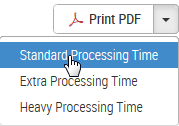
The amount of time needed to generate the PDF depends on the current load on the system. By default, the system will try to generate the PDF using Standard Processing Time, which is the fastest method possible. If the PDF generation times out, you can try again using other options by clicking the arrow on the button and then selecting Extra Processing Time or Heavy Processing Time, where heavy processing time takes the longest.