The primary objective of this firmware release is to identify transceivers that have FTLC9551 type under Part Number. Few of the transceivers having this part number have been identified as faulty and may possibly result in link failure.
Refer to the table Transceiver Part Numbers and Serial Numbers for the list of Part Numbers and Serial Numbers associated with the transceivers that are found to be malfunctioning.
Note
Please contact Trellix Support if the AFO module contains transceivers with these Part Numbers and Serial Numbers.
You can view the Transceiver Part Numbers and Transceiver Serial Numbers in two ways:
Viewing through the web interface:
To access the 100G Active Fail-Open chassis web interface, enter the IPv4 address of the chassis in a web browser.
Go to Status → Module <number>.
Note
View information from both Module 1 and Module 2.
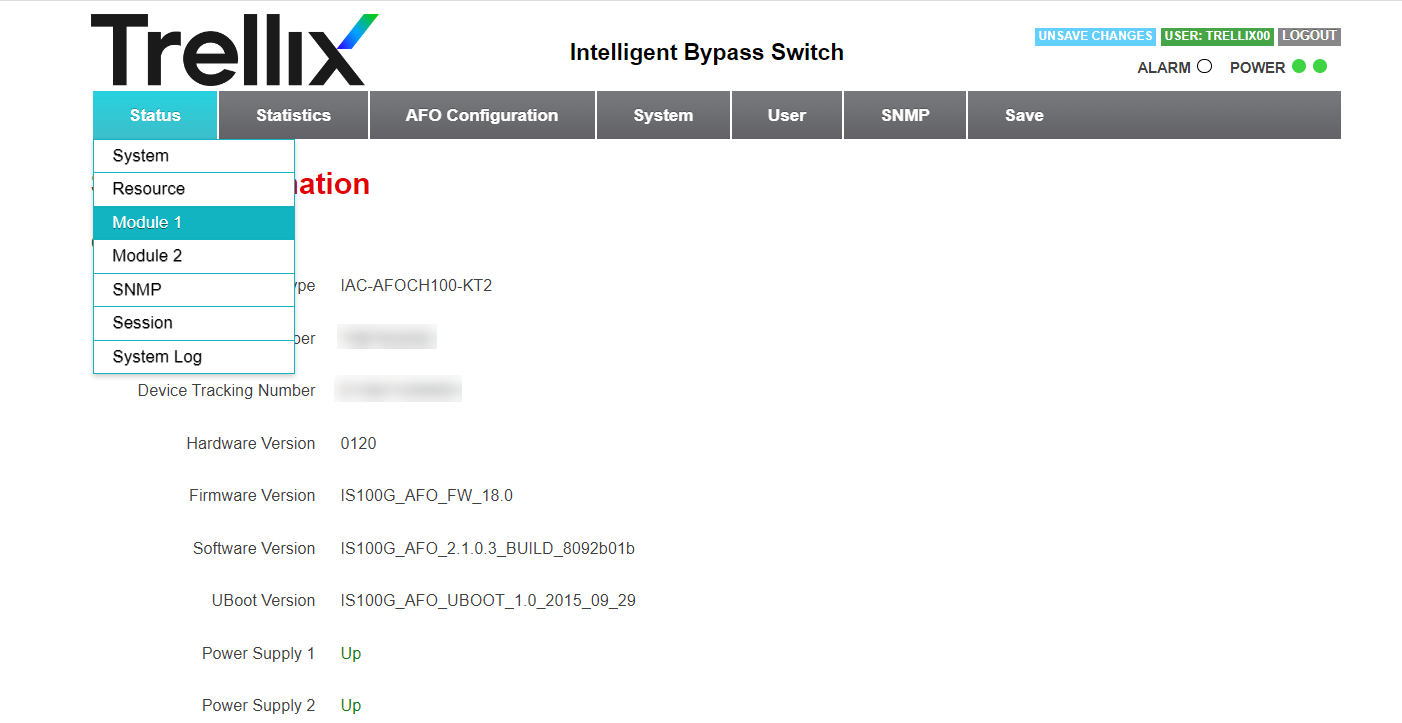
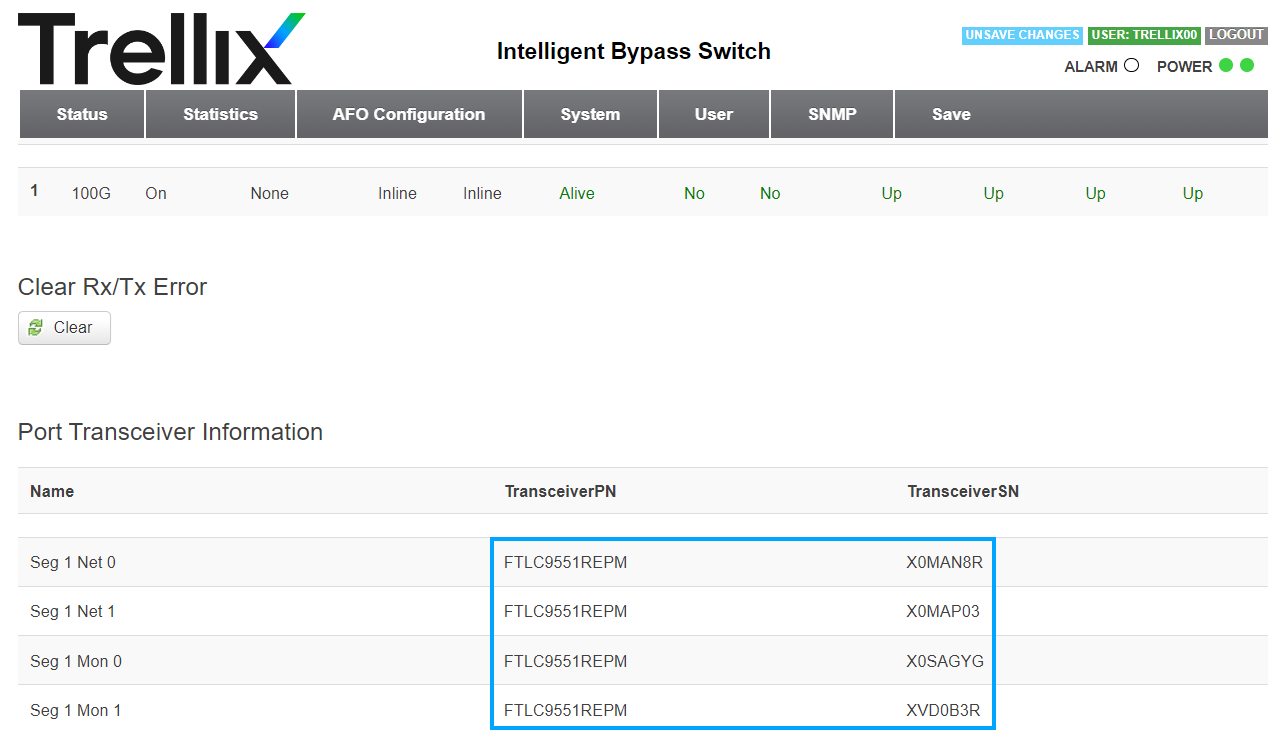
In the Module <number> Information window, scroll down to the Port Transceiver Information section. The Transceiver Part Numbers and Serial Numbers can be seen under the TransceiverPN and TransceiverSN columns respectively.
Note
Contact Trellix Support if the numbers match with those listed in Transceiver Part Numbers and Serial Numbers.
Viewing through the CLI:
Login to the CLI console of the 100G Active Fail-Open kit.
Issue
enablecommand in the terminal to enter Enable mode.Enter
show afo statein the terminal. The transceiver port and serial numbers associated with each transceiver can be found under the Port transceiver information section under the TransceiverPN and TransceiverSN columns.IS100G_AFO> enableIS100G_AFO# show afo stateModule 1 Status:Type : IAC-2P100FOSR-KITSerialNumber : N/ATrackingNumber : N/AFirmware : IS100G_AFO_MOD_1.0Speed : 100GMedia : 100GBase-SR4Transceiver : QSFP28 SR4Segment 1.1 Status:HbChecking : onHbCheckingOffReason : noneApplicationState : activeActiveState : inlinePassiveState : inlineTwoPortLinkTriggered : noRX/TX Error Occurred : yesPortNet0Link : upPortNet1Link : upPortMon0Link : upPortMon1Link : upPortNet0Health : normalPortNet1Health : normalPortMon0Health : normalPortMon1Health : normalSegmentSpeed : 100GPort transceiver information:Name TransceiverPN TransceiverSNnet0 FTLC9551REPM XXF0G86net1 FTLC9551REPM XXF0CM1mon0 AFBR-89CDDZ-CS1 AVF2111G1JEmon1 FTLC9551REPM X0SAGXMModule 2 Status:Type : IAC-2P100FOSR-KITSerialNumber : T0B7932005TrackingNumber : E135361100011Firmware : IS100G_AFO_MOD_1.0Speed : 100GMedia : 100GBase-SR4Transceiver : QSFP28 SR4Segment 2.1 Status:HbChecking : onHbCheckingOffReason : noneApplicationState : activeActiveState : inlinePassiveState : inlineTwoPortLinkTriggered : noRX/TX Error Occurred : noPortNet0Link : upPortNet1Link : upPortMon0Link : upPortMon1Link : upPortNet0Health : normalPortNet1Health : normalPortMon0Health : normalPortMon1Health : normalSegmentSpeed : 100GPort transceiver information:Name TransceiverPN TransceiverSNnet0 FTLC9551REPM X0MAN8Rnet1 FTLC9551REPM X0MAP03mon0 AFBR-89CDDZ-CS1 X0SAGYGmon1 FTLC9551REPM XVD0B3RNote
Contact Trellix Support if the numbers match with those listed in Transceiver Part Numbers and Serial Numbers.