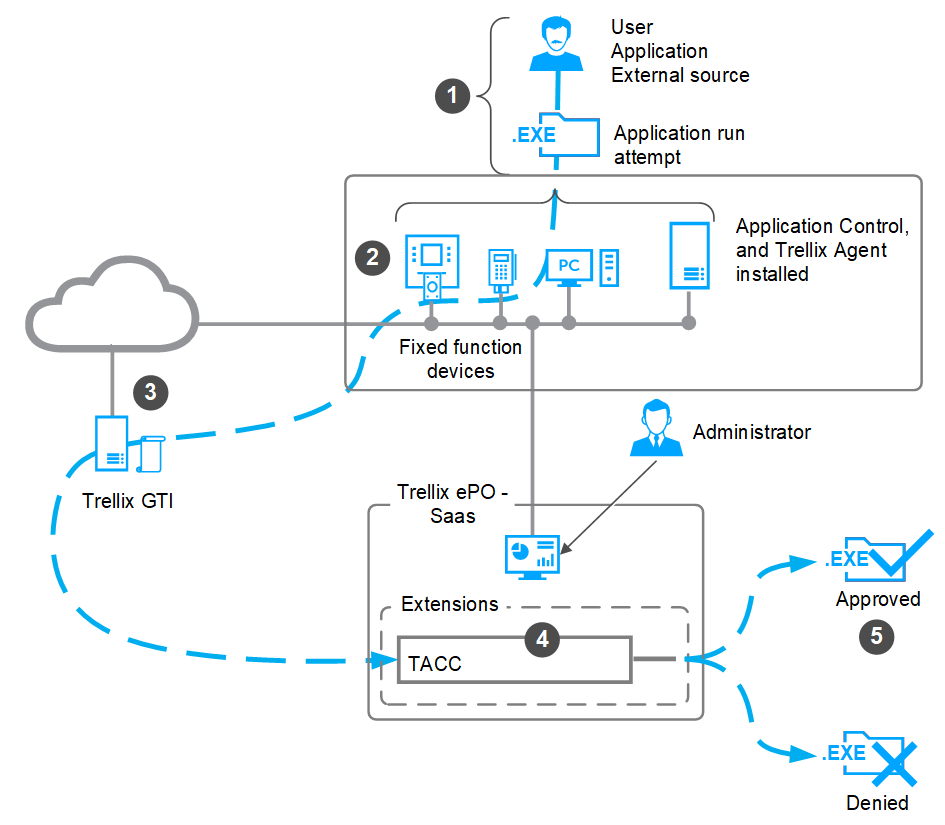
Application Control creates a allow list of all authorized executable files. When you attempt to run an executable file that isn't allowed, Application Control checks the reputation of the file and allows or blocks its execution.
A user or application tries to execute a file on a managed endpoint where Application Control and Trellix Agent are installed.
Application Control checks the reputation of the file and allows or blocks its execution.
Application Control communicates with the Trellix GTI server to fetch the reputation of the file.
The administrator manages all endpoints, deploys policies, creates rules, adds certificates, manages the inventory, monitors activities, and approves requests.
Information about the attempt to run the application is sent to the ePO - SaaS server, where it appears in a dashboard, report, or log.