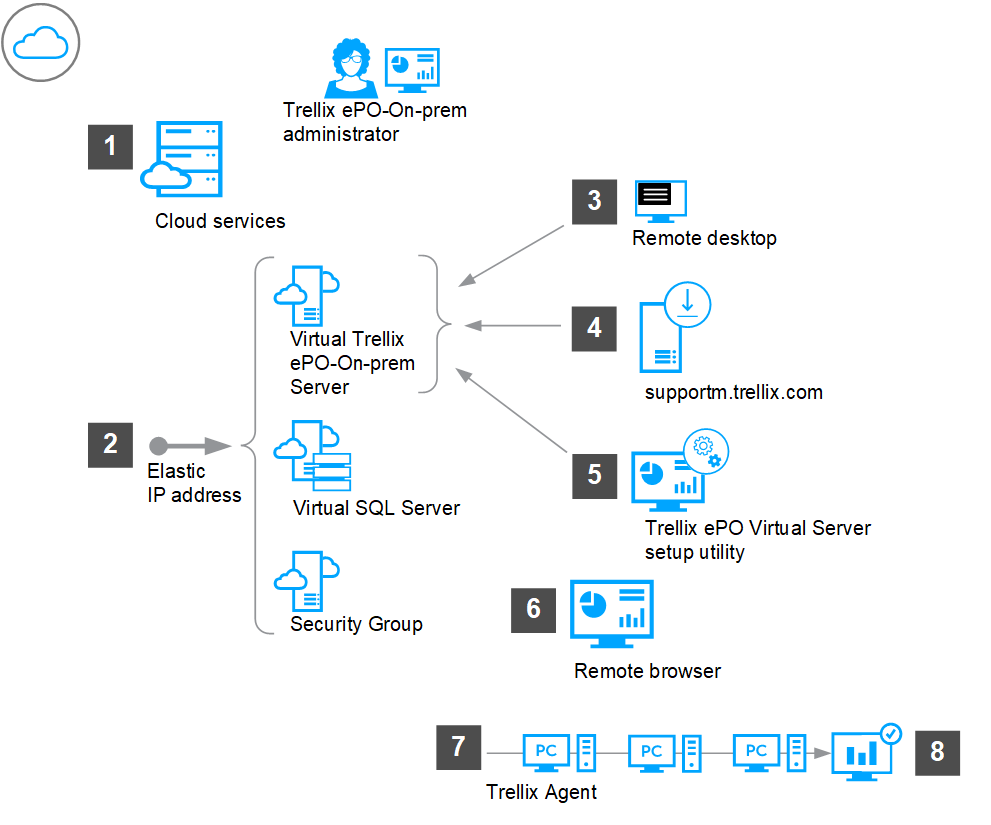
Set up a cloud services account and configure your virtual environment to run cloud services with ePO - On-prem.
Set up a cloud services account and configure these items:
Virtual server to use as your ePO - On-prem server
Virtual SQL Server
Security Group
Assign an elastic IP address to each virtual server.
From a management computer, use Remote Desktop to connect to the virtual ePO - On-prem server.
From Trellix.com, copy the ePO - On-prem software to the virtual ePO - On-prem server.
From the ePO - On-prem server, run the setup utility.
Using a remote browser, log on to ePO - On-prem using
https://< elastic IP / DNS of virtual ePO - On-prem server >:<port>.Update Trellix ePO Server Public DNS in Server Settings with elastic IP address or DNS of virtual ePO - On-prem server.
Update Published DNS name or the IP address of Agent Handler (if any) with elastic IP address or DNS of virtual Agent Handler server.
Create a Trellix Agent deployment URL or extract the Trellix Agent deployment package.
Choose a deployment method to deploy Trellix Agent.
Confirm that systems are managed by ensuring that Trellix Agent can successfully connect to ePO - On-prem.