Identify the ports on Generation 6 hardware and connect those cables.
Generation 6 hardware contains management ports so they can be managed from Trellix ESM. The following images identify the management and connection ports.
Caution
Do not connect cables to ports not labeled for a specific purpose.
Trellix ESM
The port assignments are as shown:
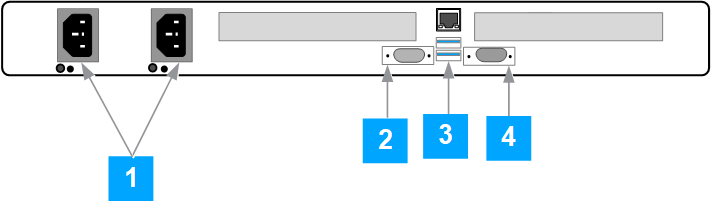 |
Power supply
VGA video
USB port
COM port
Port connections
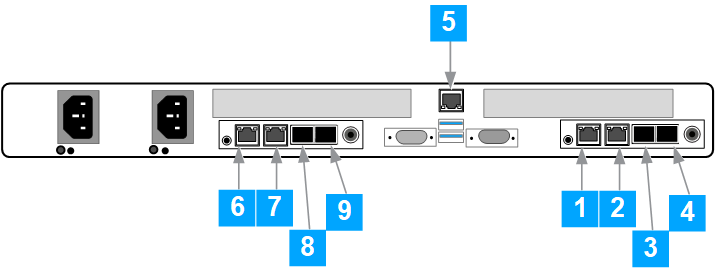 |
Slot numbers | 4-port systems | 8-port systems (add-on only) | Connections |
|---|---|---|---|
1 | MGMT1 | MGMT1 | Management subnet |
2 | MGMT2 | MGMT2 | Management subnet |
3 | ETH2 | ETH2 | Data subnet |
4 | ETH3 | ETH3 | Data subnet |
5 | IPMI | IPMI | Isolated RMM subnet |
6 | Not present | ETH4 | Data subnet |
7 | Not present | ETH5 | Data subnet |
8 | Not present | ETH6 | Data subnet |
9 | Not present | ETH7 | Data subnet |
Slot numbers | 4-port systems | 8-port systems (add-on only) | Connections |
|---|---|---|---|
1 | ETH3 | ETH3 | Data subnet |
2 | ETH2 | ETH2 | Data subnet |
3 | MGMT2 | MGMT2 | Management subnet |
4 | MGMT1 | MGMT1 | Management subnet |
5 | IPMI | IPMI | Isolated RMM subnet |
6 | Not present | ETH8 | Data subnet |
7 | Not present | ETH7 | Data subnet |
8 | Not present | ETH5 | Data subnet |
9 | Not present | ETH4 | Data subnet |
Note
The BMC/RMM port (port 5) is used for setup and troubleshooting.
High availability connections
ERC 3600 and ERC 4800 HA mode use SFP+ ports. If you are upgrading from Gen5 hardware, you need an SPF+ to Rj45 adapter. The IPMI port is not used for HA connections.
Order 1 x BASECU10G-HW (10G Base CU SFP+ Copper Module) per HA Pair (2 x ERCs). This includes a 5m direct attach cable (DAC) with SFP+ connectors for direct connection between the ERCs. Alternatively, a suitable DAC cable can be used to directly connect the SFP+ heartbeat port of each ERC.
TAA Compliant: Order 2 x BASET10G-HW-R1 (10G Base-T Copper SFP+ REV1 Module).
Non-TAA Compliant: Order 2 x BASET1G-HW (1G Base-T Copper Module).
Note
These are single modules and cables are NOT included. You must source cables separately and you are responsible for patching the modules to a switch in the ERC rack to route heartbeat traffic.
2 x SR or LR fiber transceivers are required. Contact Trellix Sales for more information.
Note
Cables are NOT included. You must source cables separately and you responsible for patching the modules into your fiber infrastructure.
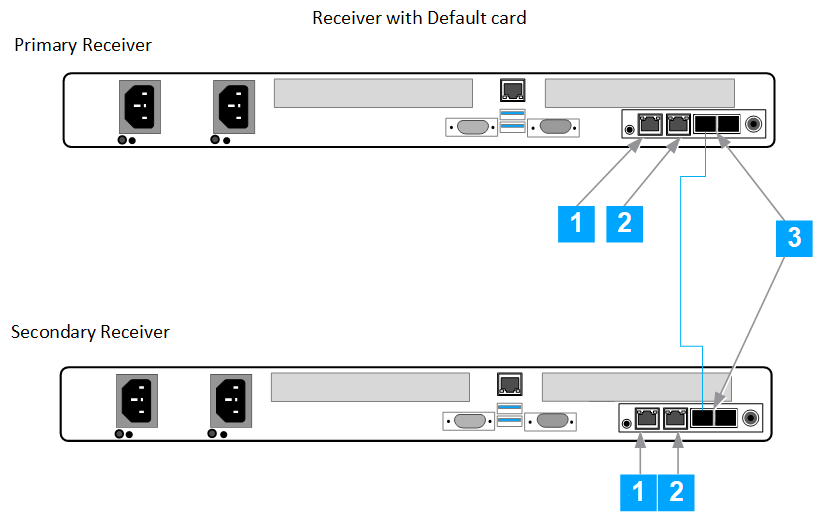 |
Port 1 is connected to the switch.
Port 2 is connected to the switch.
Port 3 of the primary receiver is connected to Port 3 of the secondary receiver.
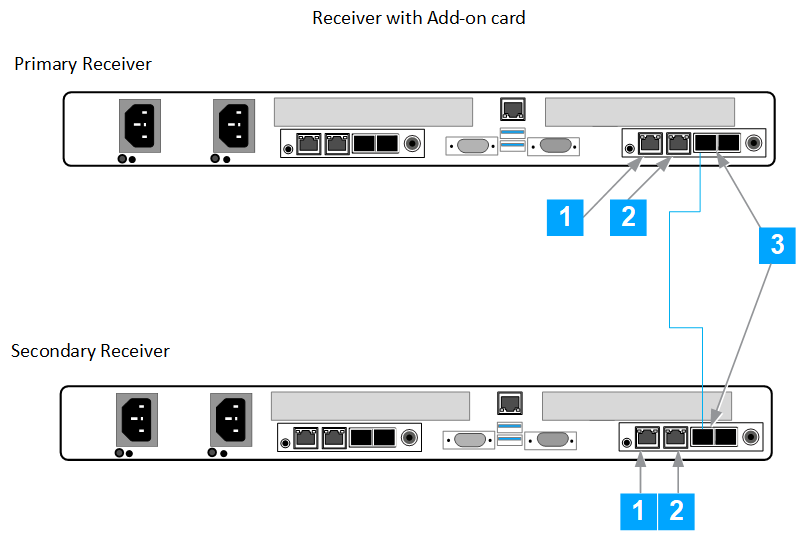 |
Port 1 is connected to the switch.
Port 2 is connected to the switch.
Port 3 of the primary receiver is connected to Port 3 of the secondary receiver.