Identify the ports on Generation 5.5 hardware and connect those cables.
Generation 5.5 hardware contains management ports so they can be managed from Trellix ESM. The following images identify the management and collection ports.
Caution
Do not connect cables to ports not labeled for a specific purpose.
Trellix ESM
The port assignments are as shown:
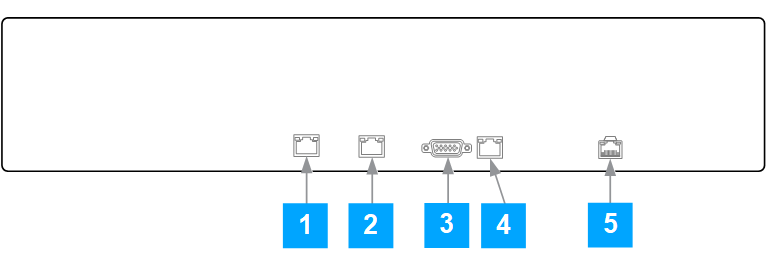
Management 1
Management 2
VGA video
Data (not used)
MGMT
Note
For 1U chassis, you must use the VGA port for monitor as the DisplayPort is not supported.
1U chassis
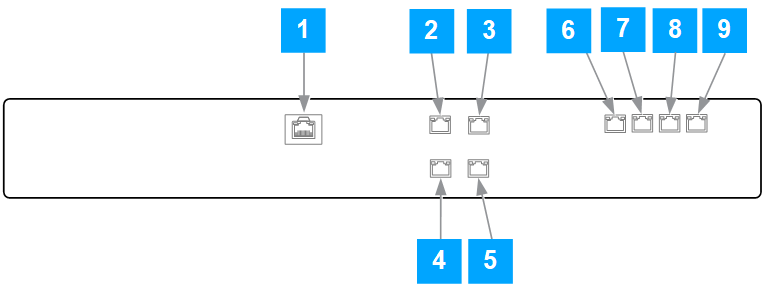
Trellix ESM - ER connections
Slot numbers | 6-port systems | 8-port systems | Connections |
|---|---|---|---|
1 | IPMI | IPMI | Isolated RMM subnet |
2 | ETH5 | ETH7 | HA |
3 | ETH3 | ETH5 | Data subnet |
4 | ETH4 | ETH6 | HA |
5 | ETH2 | ETH4 | Data subnet |
6 | Not Present | ETH3 | Data subnet |
7 | Not Present | ETH2 | Data subnet |
8 | MGMT2 | MGMT2 | Management subnet |
9 | MGMT1 | MGMT1 | Management subnet |
Trellix ESM - ADM connections
Slot numbers | 6-port systems | 8-port systems | Connections |
|---|---|---|---|
1 | IPMI | IPMI | Isolated RMM subnet |
2 | ETH0 | ETH0 | Data subnet |
3 | ETH2 | ETH2 | Data subnet |
4 | ETH1 | ETH1 | Data subnet |
5 | ETH3 | ETH3 | Data subnet |
6 | Not present | Data subnet | |
7 | Not present | Data subnet | |
8 | MGMT2 | MGMT2 | Management subnet |
9 | MGMT1 | MGMT1 | Management subnet |
1U chassis HA connections
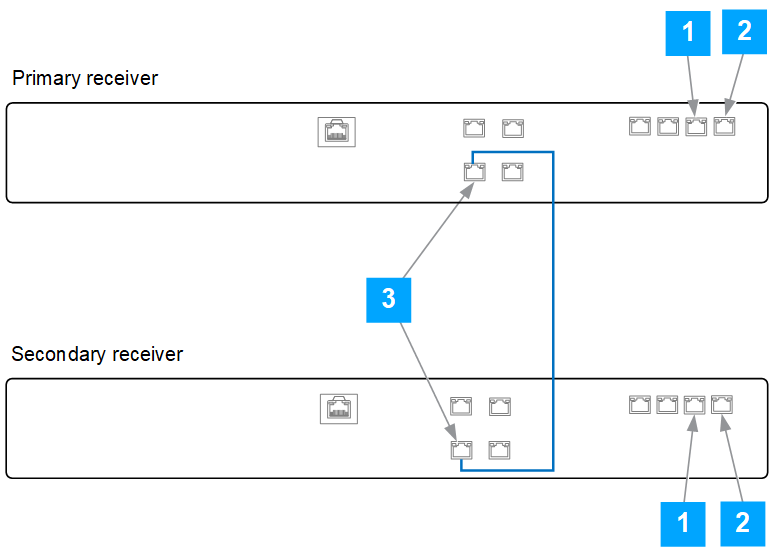
Port 1 is connected to the switch.
Port 2 is connected to the switch.
Port 3 of the primary receiver is connected to Port 3 of the secondary receiver.
2U chassis
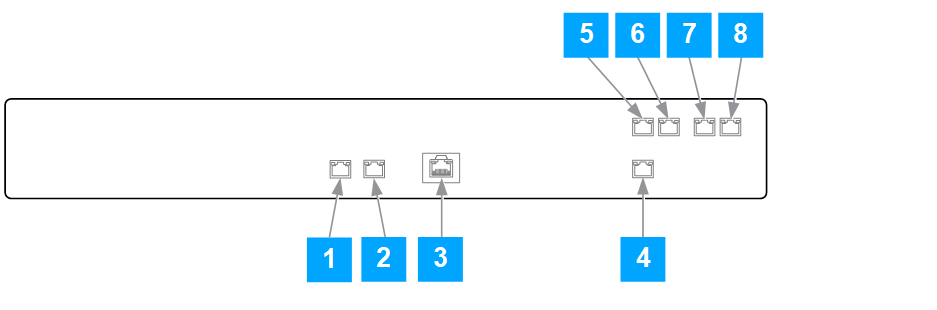
Slot numbers | Ports and connectors | Additional information | For Non-HA | For HA |
|---|---|---|---|---|
1 | Eth0 | Label - MGMT 1 | - | - |
2 | Eth1 | Label - MGMT 2 | Additional MGMT port | Shared IP address |
3 | Serial RJ45 | - | - | - |
4 | MGMT | Label - IPMI (Intelligent Platform Management Interface) | Remote management access | |
5 | Eth5 | - | - | |
6 | Eth4 | - | Additional MGMT port | Connection to Eth4 (Secondary receiver) - Heartbeat |
7 | Eth3 | Additional MGMT port | - | - |
8 | Eth2 | Additional MGMT port | - | - |
2U chassis HA connections
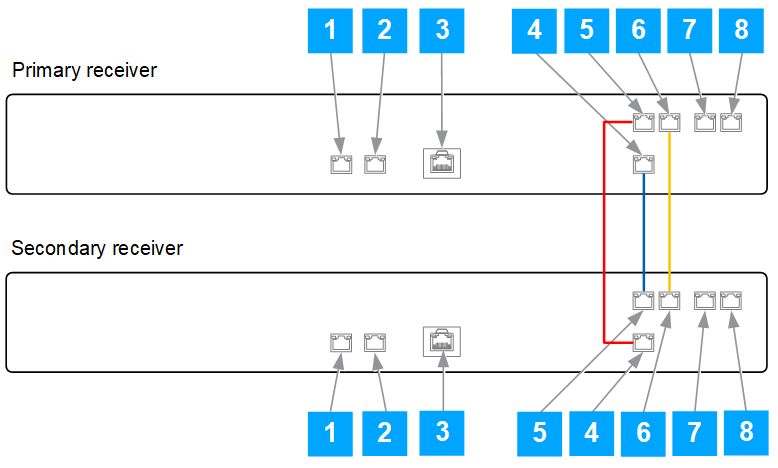
Eth0 - connected to the switch
Eth1 - connected to the switch
Serial connection RJ45 - not used
MGMT of primary receiver is connected to Eth5 (labeled 5) of secondary receiver
Eth5 of primary receiver is connected to MGMT (labeled 4) of secondary receiver
Eth4 of primary receiver is connected to Eth4 (labeled 6) of secondary receiver
Eth3 - can use as additional MGMT port
Eth2 - can use as additional MGMT port