Before you begin
You must make sure the fail-open switch is fully powered off before you attempt to remove it from the chassis.
Follow the steps in this section to power off and remove the fail-open switch.
Task
-
Power off the fail-open switch using the web interface or CLI command prompt.
- If you are using the web interface, click the
Rescue tab and check the
Power Off checkbox in the
System Restore section. To access the web interface, refer
Access the fail-open switch web interface.
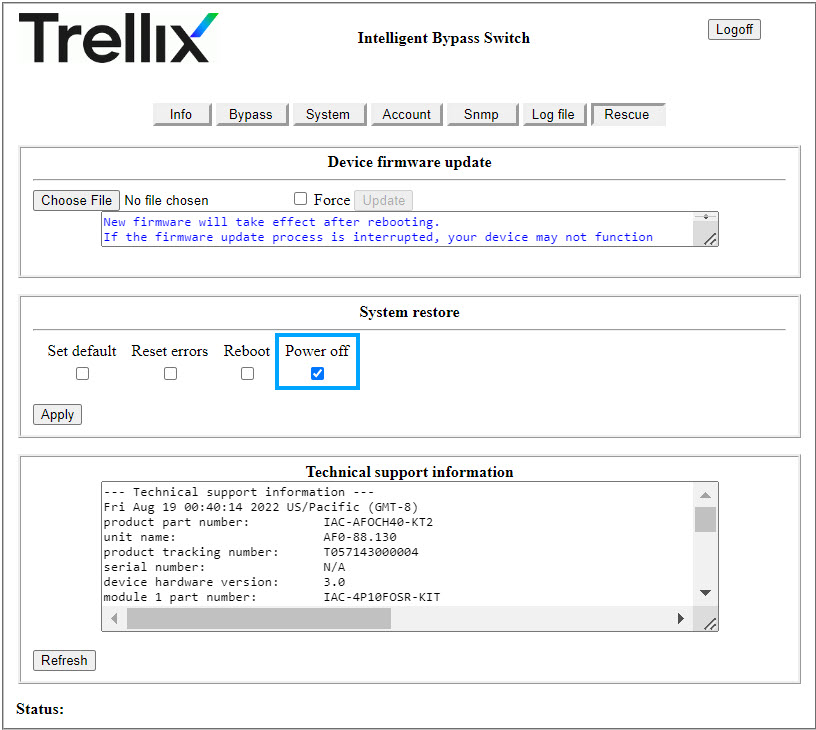
- If you are using the CLI command prompt, type power_off and press Enter. To access the CLI command prompt, refer 3. Configure fail-open switch parameters_Silicom.
- If you are using the web interface, click the
Rescue tab and check the
Power Off checkbox in the
System Restore section. To access the web interface, refer
Access the fail-open switch web interface.
- When the fail-open switch is powered off, remove the captive screws and slide it out of the chassis.