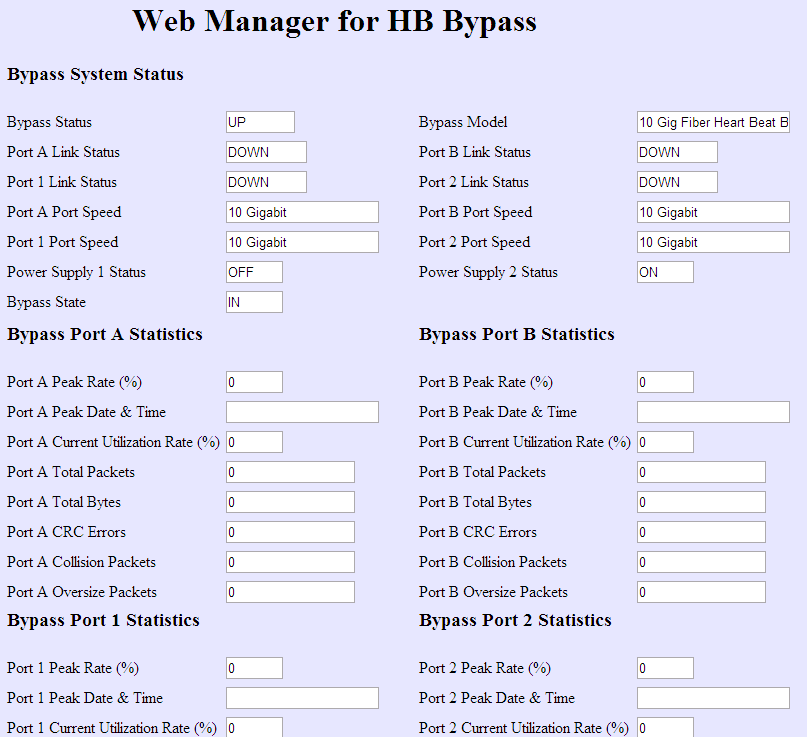
Besides using CLI commands, you can view and configure fail-open switch settings for an active fail-open switch through a web console called the Web Manager. You can restrict or permit access to the Web Manager depending on your preferences.
The web interface for fail-open switch model1 allows you to manage the following functions:
- Configuration of general fail-open switch parameters, such as IPv4 address, subnet mask, and gateway IPv4 address.
- Enabling tap mode for the fail-open switch
- Returning from tap mode to inline mode
- Configuration of notifications through SNMP traps
Follow these steps to access the Web Manager.
Task
- Open a browser such as Internet Explorer or Mozilla Firefox.
-
In the address bar, enter the fail-open switch IP address.
You will be prompted for the username and password.
- Enter the username and password. The default username and password are Trellix.
- Submit credentials.
Results