Use this file to discover all available pages before exploring further.
The new docs.trellix.com features a modernized UI and AI-powered conversational search. Content is currently available in English, with additional languages launching in early November 2026. We hope you enjoy the updated experience.
The fourth and final step in Vulnerability Manager configuration is adding Vulnerability Manager scan configurations.
You can define Scan Configurations (also known as scans) in the Vulnerability Manager system for different host IP address ranges, and then add them to Manager.
When you add a scan configuration to the Manager, a check on whether this scan configuration exists in the Vulnerability Manager database is done. If the scan configuration exists, it is saved in the Manager database. The scan configuration is also updated in the Manager cache.
Manager cache contains the scan configuration ID and the IP address ranges defined in the scan configuration. When the user requests for an on-demand scan of a host IP address from Threat Explorer, the appropriate scan configuration ID is selected. Then, the scan configuration associated with the scan configuration ID is used to scan the host IP address.
Note
Important pre-requisite: You need to run the scan configuration defined in the Vulnerability Manager engine once, before adding a scan configuration to Manager. Each scan configuration defined in the Vulnerability Manager is associated with a Vulnerability Manager engine. When you run the scan configuration for the first time at the Vulnerability Manager side, the Vulnerability Manager engine in which the scan configuration was last executed, gets associated with that scan configuration. This step is essential for successfully adding the scan configuration to Manager.
Tip
It is recommended that you define a common
user in the
organizations defined in the Vulnerability Manager side. Ensure that this user has full access permissions to Vulnerability Manager engine. Through this user, you can conveniently access various scan configurations defined in all the organizations in Vulnerability Manager. This will ease the access of scan configurations defined in Vulnerability Manager. For more information about organizations and scan configurations, see the section Working with Scans in
McAfee Vulnerability Manager Product Guide. The product names "Foundstone", and "Vulnerability Manager " refer to the same product.
The
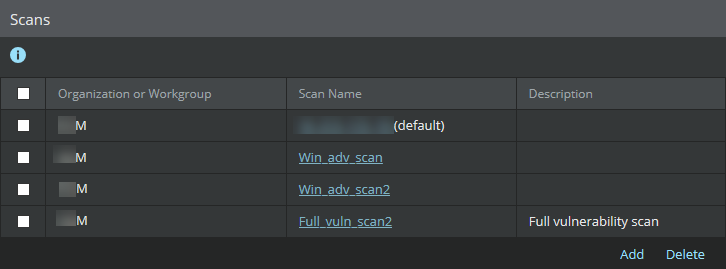
Added Vulnerability Manager Scan Configurations page appears.
Note
You can delete individual scan configurations or multiple scan configurations from the
Added Vulnerability Manager Scan Configurations page. Click
Delete to delete a scan configuration. For deleting multiple scan configurations, select the required checkboxes, and then click
Delete.
To add a scan configuration, click
New.
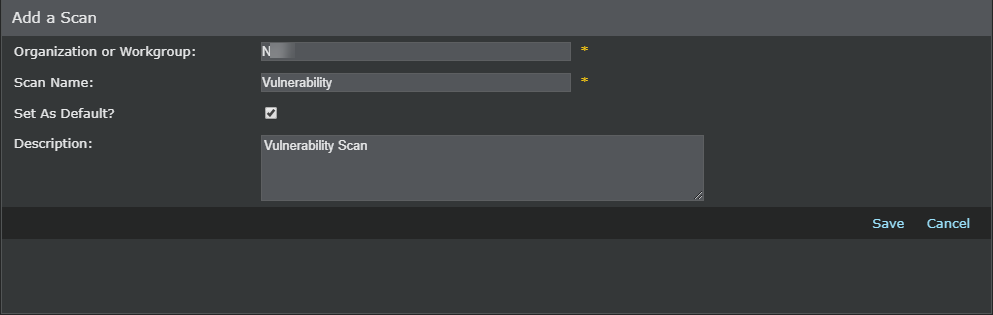
Add a Scan dialog The
Add a Scan window allows you to enter scan configurations, equivalent to already defined configurations in the Scan engine for the different host IP address ranges.
Enter the
Organization or Workgroup name.
Provide a name for the scan.
Select
Set As Default? if you want to set this scan configuration as the default configuration.
If necessary, enter a description of the scan configuration in
Description.
Select
Save. The
Added Vulnerability Manager Scan Configurations page displays all the scan configurations that are added to Manager.
The configuration steps for Vulnerability Manager are complete at this point.