This procedure describes how to cable Sensors in a stack for high availability.
Plug the QSFP28 Direct Attach Copper (DAC) cable into port G1/1 or G1/2 of the first Sensor in the primary stack.
Connect the other end of the cable into the corresponding port labeled G1/1 or G1/2 of the first Sensor in the secondary stack.
Repeat steps 1 and 2 for the other Sensors in the primary and secondary stack.
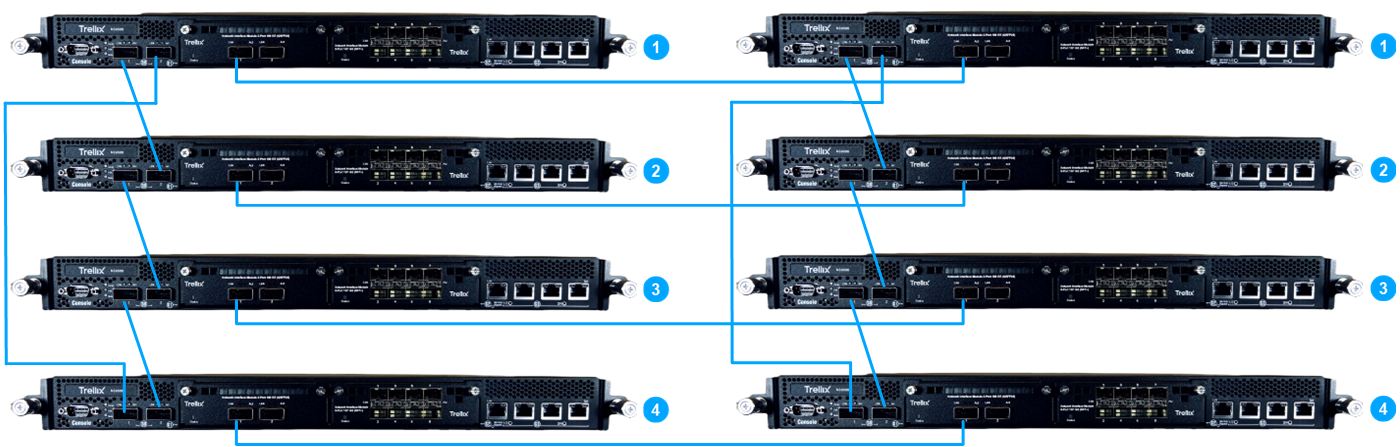
On the rear panel of each NS9500 Sensor, plug a RJ-45 cable in the Management port (labeled MGMT).
Plug the other end of the cable into the network device connected to your Manager server.
Create a failover pair using Manager's Failover Pairs page.
Note
To connect the first Sensor in the primary stack with the first Sensor in the secondary stack, you can use either the QSFP28 module (2x100 G) module or the QSFP+ (4x40 G) module. The QSFP28 modules support the DAC cables for interconnect.