Follow these steps to edit the configuration settings for port mirroring based on all traffic types (including SSL traffic) and SSL decryption mirroring using the Network Security appliance Web UI. You can change the configuration settings for each monitoring interface pair.
Note
When the Classic edition Network Security appliance is converted to SmartVision edition, the Port Mirroring option is not available under Settings.
In the Web UI, choose Settings > Port Mirroring.
In the table, select the checkbox next to the monitoring interface pair you want to edit.
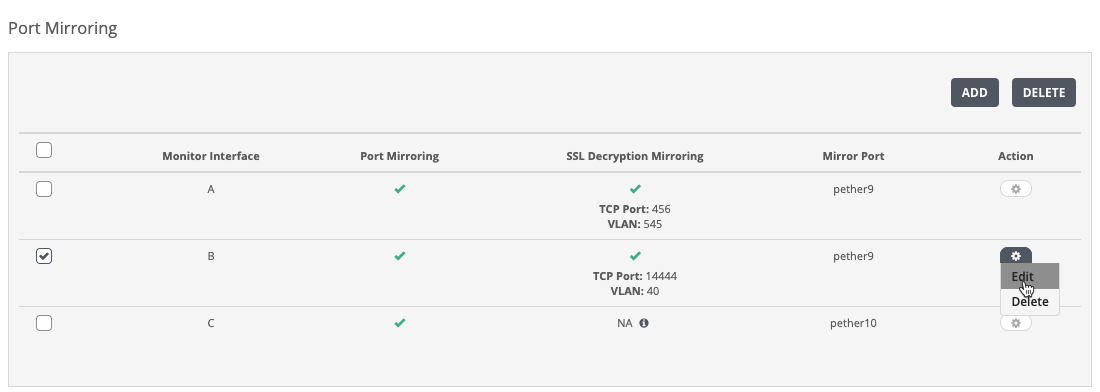
Click the action icon (
.png) ) in the column.
) in the column.Click Edit. The Edit Port Mirroring window opens.
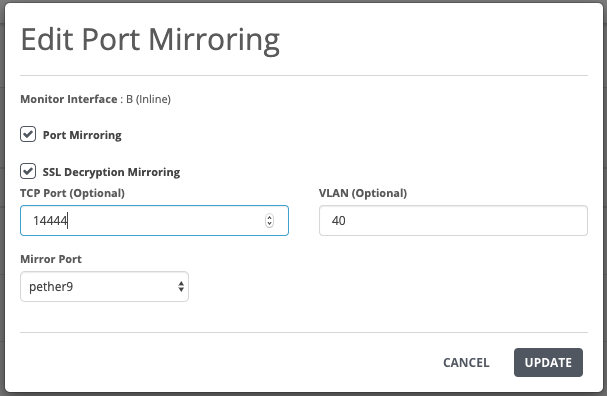
Clear the Port Mirroring checkbox to remove port mirroring for all traffic types (including SSL traffic) from the monitoring interface pair.
Clear the SSL Decryption Mirroring checkbox to remove mirroring of SSL decrypted traffic from the monitoring interface pair.
In the Mirror Port drop-down list, change the port that you want to forward the mirrored traffic.
Click Update.
The following message appears:
