You can configure and update the attack settings either by inheriting the settings from the master IPS policy or set them explicitly in the attack details panel. The attack details panel has two tabs: Settings and Description. On the Settings tab, you can set the configurable fields for Sensor and Manager actions. The Description tab is a read-only tab where you can view the attack and signature details.
Task
-
On the
Attack Definitions tab, double-click on the row of the attack that you want to configure and update the settings. The attack details are displayed on the right panel displaying the settings under the
Settings tab.
Settings tab 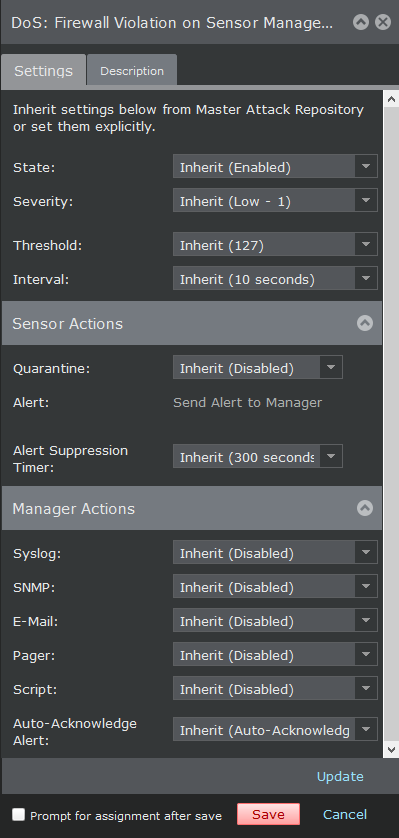
-
Configure the settings for the attack definitions
The following fields are displayed for attacks of categories such as exploit, policy violation, malware, and reconnaissance:
Option Definition State Select any following options: - Inherit (Enabled)
- Enabled
- Disabled
Severity Select the severity level of the attack: - Inherit (Medium - 5)
- Info - 0
- Low - 1
- Low - 2
- Low - 3
- Medium - 4
- Medium - 5
- Medium - 6
- High - 7
- High - 8
- High - 9
Threshold This field is displayed only configuring attacks of type DoS Threshold and Reconnaissance Correlation attacks. Select the severity level of the attack: - Inherit
-
Set explicitly
Note
If you select the option Set explicitly, specify the threshold value in the number field.
Interval This field is displayed only configuring attacks of type DoS Threshold and Reconnaissance Correlation attacks. Select the interval duration: - Inherit
-
Set explicitly
Note
If you select the option Set explicitly, specify the interval duration seconds in the number field.
Sensor Actions Response Block Select any of the following blocking options: - Inherit (Disabled)
- Enable Blocking
- Enable SmartBlocking
- Disabled
Quarantine Select any of the following quarantine options: - Inherit (Disabled)
- Quarantine Attacker
- Quarantine and Remediate
- Attacker
- Disabled
TCP Reset Select any of the following TCP reset options: - Inherit (Disbaled)
- Reset Src - resets to the source.
- Reset Dest - resets to the destination.
- Reset Src and Dest - resets to the source and destination.
- Disabled
ICMP Message Select any of the following ICMP message options: - Inherit (Disabled)
- Send ICMP Host Unreachable to Src
- Disabled
Alert Select any of the following alert options: - Inherit (Send Alert to Manager)
- Send Alert to Manager
- Disabled
Alert Suppression Timer This field is displayed only configuring Sensor response for attacks of type Reconnaissance Correlation attacks. Select the severity level of the attack: - Inherit
-
Set explicitly
Note
If you select the option Set explicitly, specify the seconds in the number field.
Capture Packets Attack and Pre-Attack Select any of the following pre-attack packet capture options: - Inherit (Attack and Prior 128 Bytes)
- Attack and Prior 128 Bytes
- Disabled
Post-Attack Select any of the following post-attack packet capture options: - Inherit (Disabled)
- Enabled
- Disabled
Flows to Capture This field is displayed only when you select Post-Attack as Enabled. The following are the options available in this field:
- Inherit (Attack Flow Only)
-
Attack flow only
By selecting the option Attack flow only, a new drop-down list is displayed. Select any of the following options:
- Attack Packets only
- Next N packets - type the number of packets in the blank packets field.
- Next N time - select the time options from the given drop-down list. The options are:
- Seconds
- Minutes
- Hours
- Days
- Rest of flow
-
Flows from Src and Flows to Src and Dest
By selecting the option Flows from Src and Flows to Src and Dest, a new drop-down list is displayed. Select any of the following options:
- Next N packets - type the number of packets in the blank packets field.
- Next N time - select the time options from the given drop-down list. The options are:
- Seconds
- Minutes
- Hours
- Days
Bytes to Capture This field is displayed only when you select Post-Attack as Enabled. The following are the options available in this field:
- Inherit (All Bytes in Each Packet)
- All Bytes in Each Packet
-
First N Bytes in Each Packet
By selecting the option First N Bytes in Each Packet , a new field to enter the number of bytes to capture is displayed. Type the number in the blank field.
Manager actions Syslog Select any of the following syslog options: - Inherit (Disabled)
- Send Syslog Message
- Disabled
SNMP Select any of the following SNMP options: - Inherit (Disabled)
- Send SNMP Trap
- Disabled
E-Mail Select any of the following email options: - Inherit (Disabled)
- Send E-Mail Message
- Disabled
Pager Select any of the following pager options: - Inherit (Disabled)
- Send Page
- Disabled
Script Select any of the following script options: - Inherit (Disabled)
- Run Script
- Disabled
Auto-Acknowledge Alert Select any of the following auto-acknowledgment options: - Inherit (Disabled)
- Auto-Acknowledge Alert
- Disabled
Update Click here to update the settings. Fields in the Capture Packets and Manager actions sections are displayed only when alerting (Alert field option) is enabled or inherited.
The fields in the Sensor actions section is not displayed for malware attack definitions that support advanced malware policies as these settings are configured in the malware policy. However, the Manager actions are configurable for such malware attacks.
The following table explains the various Sensor responses that can be performed for different type of attacks. Yes signifies that the Sensor response can be performed for the attack type. No signifies that the Sensor response cannot be performed for the attack type.
Sensor responses for attack types Sensor response Exploit DoS Learning DoS Threshold Reconnaissance Signature Policy Violation Malware Reconnaissance Correlation Block Yes Yes No Yes Yes Yes No Quarantine Yes No No Yes Yes Yes Yes TCP Reset Yes No No Yes Yes Yes No ICMP Message Yes No No Yes Yes Yes No Alert Yes Yes Yes Yes Yes Yes No Capture packets Yes No No Yes Yes Yes No Alert Suppression Timer No No No No No No Yes