Before you begin
- To configure SNMP traps, you will require a server that will act as an SNMP server. The SNMP server can be any Windows or Linux system installed with an MIB browser, such as iReasoning.
- Make sure your Active Fail-Open chassis IP address can be reached within the network.
- Make sure your SNMP server and Active Fail-Open chassis are able to communicate.
- In addition, you will need to obtain MIB files to decode alert codes sent by the Active Fail-Open chassis. These files are specific to the Active Fail-Open chassis and can be obtained by clicking on this link: KB86247.
Note
The SNMP feature of your Active Fail-Open chassis can only be used to send notifications through SNMP traps.
Task
- Connect an RJ-45 cable to the Management port at the front of the Active Fail-Open chassis.
- Connect the other end to a network device so that the SNMP server is reachable through the network.
- Copy the Fail-Open module MIB files to a suitable location on the SNMP server.
-
Set up the Active Fail-Open chassis IP address, network mask, and SNMP manager IP address by logging on to the web interface.
Note
You are also able to configure various other parameters specific to SNMP traps.
-
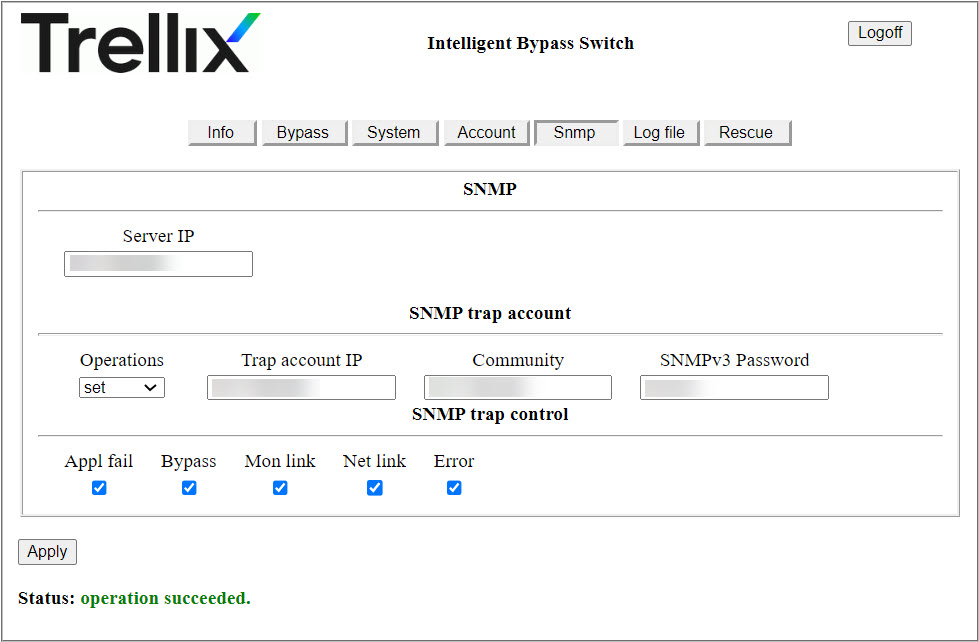
On the web interface, click the
SNMP tab.
The SNMP configuration page appears.
-
To configure the SNMP server IPv4 address, enter it in the
Server IP field.
The credentials used will be the default credentials for the Fail-Open module.
-
(Optional) If you want to configure multiple SNMP accounts, in the
SNMP trap account section select
set from the
Operations drop-down.
Note
If you do not configure additional SNMP trap accounts, all traps will be routed to the main SNMP trap account you have setup here.
- Enter the IPv4 address for the other account.
-
(Optional) You can specify an alternate SNMPv3 password for the additional SNMP server.
Note
SNMP Community strings are used only by devices which support SNMPv1 and SNMPv2 protocols. SNMPv3 uses username and password authentication, along with an encryption key. You can configure a community string if the SNMP software you use requires you to configure one regardless of the requirements in this user-interface.
- Click Apply to save your configuration.
-
In the SNMP server, configure these settings to enable SNMPv3 traps for the active fail-open kit.
- USM user: Trellix00
- Security level: auth, priv
- Auth algorithm: SHA
- Auth password: Trellix00
- Privacy algorithm: AES
- Privacy password: Trellix00
- Load MIB file. If you do not have the appropriate MIB file, contact Trellix Support.
- Make sure the SNMP server and Fail-Open module are able to communicate through the network.