Use the Operational Modes area in the Policy Settings page to configure operational modes for an inline policy on an interface using the Web UI.
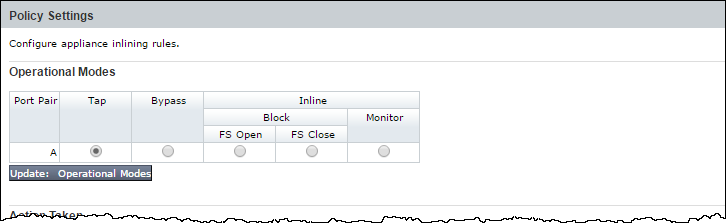
Mode | Description |
|---|---|
Tap | Operate without inline functionality. This mode is the default for out-of-band monitoring. |
Bypass | Starting with version 7.1.0, Network Security appliances have the ability to bypass packets larger than 1650 bytes rather than dropping them. |
Block | Types of inline blocking attacks:
|
Monitor | Monitor all packets without any blocking and generate alerts about potential infections. |
In the Web UI, choose Settings > Inline Operational Modes.
Select the relevant operational mode for each port pair in the Operational Modes area:
Tap
Bypass
Block—Select one of the following types of block attacks:
FS Open (fail-safe open)
FS Close (fail-safe close)
Monitor
To configure the appliance with the selected operational modes, click Update: Operational Modes. The following message appears:
