You can use the Web UI or CLI to configure the method by which the Network Security appliance sends IPS event notifications:
About IPS event notification methods and criteria
Configuring IPS event notification methods (Web UI)
Configuring IPS event notification methods (CLI)
About IPS event notification methods and criteria
IPS event notification is supported by all of the FireEye event notification methods: sending email using SMTP, posting to Web servers, logging messages to remote syslog servers, or sending traps to SNMP servers.
IPS event notifications sent by rsyslog include all severity levels (1 through 10).
IPS event notifications sent by email, HTTP, or SNMP are limited to IPS critical events (severity levels 7 through 10) and IPS alerts (MVX-correlated IPS events).
FireEye event notification method | Criteria for IPS event notifications |
|---|---|
rsyslog—Log notification messages to remote syslog servers. | Minor severity (1–3), Major severity (4–6), Critical severity (7–10) |
email—Send notification email messages using SMTP. | Critical severity or MVX‑correlated |
http—Post notification messages to Web servers using HTTP. | Critical severity or MVX‑correlated |
snmp—Send traps to SNMP servers. | Critical severity or MVX‑correlated |
You can configure when IPS event notifications are sent by using either the Web UI or the CLI.
Configuring IPS event notification methods (Web UI)
This topic describes how to use the Web UI to configure the FireEye event notification delivery methods that an IPS platform uses to send IPS event notifications.
Prerequisites
Log in to the appliance Web UI as Operator or Admin.
Set the default time zone for event notifications, as described in the Network Security System Administration Guide.
Enable and configure the notification services you will use for IPS event notifications:
Email
IPS critical event notifications are sent by email to one or more addresses using SMTP.
Configure email settings for administrative events, as described in "Configuring Administrative Email Settings Using the Web UI" in the Network Security System Administration Guide.
To configure SMTP for event notifications, choose Settings > Notifications, click the email column heading, and then configure the settings that appear in the Settings column and also in a separate panel below the main table. For details, see "Configuring Email Notifications" in the Network Security User Guide.
Web server
IPS critical event notifications are posted to one or more Web servers.
To configure Web servers for event notifications, choose Settings > Notifications, click the http column heading, and then configure the settings that appear in the Settings column and also in a separate panel below the main table. For details, see "Configuring HTTP Notifications" in the Network Security User Guide.
Remote syslog server
All IPS event notifications are sent to a remote syslog server.
To configure a remote syslog server for event notifications, choose Settings > Notifications, click the rsyslog column heading, and then configure the settings that appear in the Settings column and also in a separate panel below the main table. For details, see "Configuring rsyslog Notifications" in the Network Security User Guide.
SNMP
IPS critical event notification traps are sent to one or more SNMP servers.
To configure an SNMP server for event notifications, choose Settings > Notifications, click the snmp column heading, and then configure the settings that appear in the Settings column and also in a separate panel below the main table. For details, see "Configuring SNMP Notifications" in the Network Security User Guide.
Procedure
To configure notification of IPS events:
Choose Settings > Notifications to display the current configuration of event notifications.
In the following example, all FireEye event notification methods are enabled, and all events types except IPS events are enabled for notification:
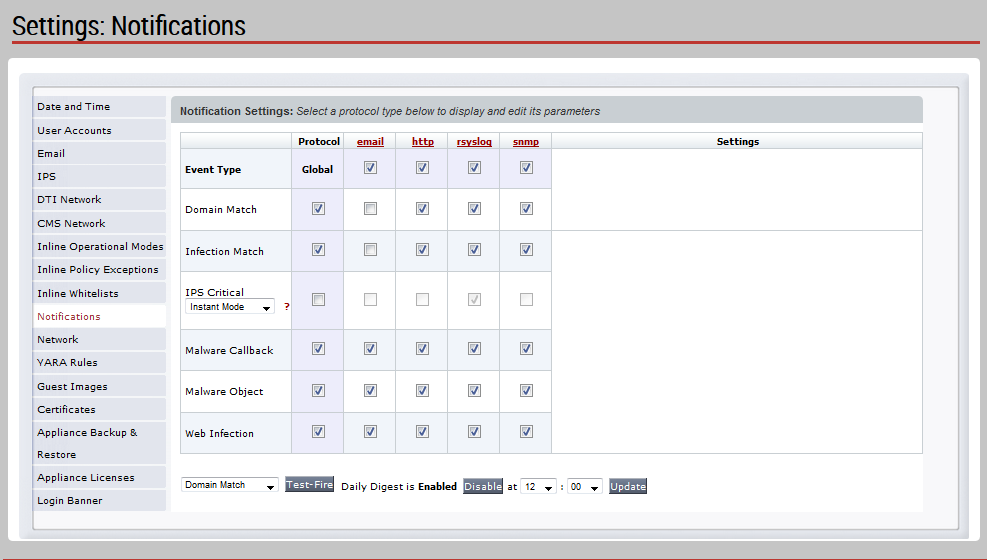
Enable notification methods for critical and major IPS events by selecting options in the IPS Critical row:
To enable or disable all notification methods for IPS events, select or clear the option in the Global column. If you select this option, you can enable or disable IPS event notification for any notification method. If you clear this option, you cannot enable IPS event notifications for any notification method.
To enable email notifications for IPS critical events, select the option in the email column.
To enable Web server notifications for IPS critical events, select the option in the http column.
To enable remote syslog server notifications for IPS critical, major, or minor events, select the option in the rsyslog column.
To enable SNMP traps for IPS critical events, select the option in the snmp column.
To configure a notification method, click the link in the column heading. Then configure the settings that appear in the Settings column and also in a separate panel below the main table. For more detailed information, see the Network Security System Administration Guide.
To enable or disable daily digest mode for email notifications, click Enable or Disable next to the "Daily Digest" message below the table. To change the time the digest is sent, choose a new time and click Update.
Next step in setting up IPS
Configuring IPS Event Notification Methods (CLI)
This topic describes how to use the CLI to configure the FireEye event notification delivery methods that an IPS platform uses to send IPS event notifications.
Prerequisites
Log in to the appliance CLI as Operator or Admin.
Use the
fenotify enableCLI command in configuration mode to enable FireEye notifications.Use the
fenotify default timezoneCLI command in configuration mode to set the default time zone for event notifications. For more information, see the Network Security System Administration Guide and the FireEye CLI Command Reference.Enable and configure the notification services you will use for IPS event notifications:
Email
IPS critical event notifications are sent by email to one or more addresses using SMTP.
Configure email settings for administrative events, as described in "Configuring Administrative Email Settings Using the CLI" in the Network Security User Guide.
To configure SMTP for event notifications, use the following CLI commands:
•
fenotify email default•
fenotify email enable•
fenotify email serviceWeb server
IPS critical event notifications are posted to one or more Web servers.
To configure Web servers for event notifications, use the following CLI commands:
•
fenotify http default•
fenotify http enable•
fenotify http serviceRemote syslog server
All IPS event notifications are sent to a remote syslog server.
Configure a remote syslog server for event notifications by using the following CLI commands:
•
fenotify rsyslog default•
fenotify rsyslog enable•
fenotify rsyslog serviceSNMP
IPS critical event notification traps are sent to one or more SNMP servers.
To configure an SNMP server for event notifications, use the following CLI commands:
•
fenotify snmp default•
fenotify snmp enable•
fenotify snmp service
For more information, see the Network Security User Guide.
Procedure
To configure delivery methods for IPS event notifications:
Enter the CLI configuration mode.
hostname > enable hostname # configure terminalEnable or disable IPS event notification for each notification protocol.
To enable IPS event notification for a notification protocol, use the CLI command
fenotify <protocol> alert ips‑event enable, where<protocol>specifies the notification protocol.To disable IPS event notification for a notification protocol, use the
noform of the command.
The following example commands enable sending notifications of IPS critical events by email, posting to Web servers, logging messages to a remote syslog server, and by SNMP traps:
hostname (config) # fenotify email alert ips-event enable hostname (config) # fenotify http alert ips-event enable hostname (config) # fenotify rsyslog alert ips-event enable hostname (config) # fenotify snmp alert ips-event enableNote
Major-severity and minor-severity IPS events are supported for remote syslog servers only.
Verify your changes.
hostname (config) # show fenotify alerts FireEye Notification Enabled: yes FireEye Alerts: email http rsyslog snmp -------------------------------- Global yes yes yes yes ---- ---- ---_ ---- domain-match yes |no no yes no infection-match yes |no no yes no ips-event yes |yes yes yes yes malware-callback yes |no no yes no malware-object yes |no no yes no web-infection yes |no no yes no Digest notification: Time : 12:00 Enabled : yesSave your changes.
hostname (config) # write memory