You can use the Web UI or CLI to configure the delivery mode by which the Network Security appliance sends IPS event notifications:
About IPS event notification delivery mode
Configuring IPS event notification mode (Web UI)
Configuring IPS event notification mode (CLI)
About IPS event notification delivery mode
If IPS event notifications are configured (as described in Configuring IPS event notification delivery methods), the system uses one of the following modes to deliver the notifications:
instant—Send notification only when an IPS event is detected. This is the default value.
confirmation—Send notification only when an attack has been confirmed (either positive or negative).
dual—Send notifications both when an IPS event is detected and when an attack has been confirmed.
By default, the system is configured to use instant delivery mode, which is useful in an organization that archives notifications and then filters and analyzes the information later. When you first activate IPS features, we recommend that you use dual mode so that you see both detection and confirmation of IPS events. If your organization does not archive the volume of notifications generated in this mode, you can decrease the volume of notifications by using confirmation mode.
You can configure when IPS event notifications are sent by using either the Web UI or the CLI.
Configuring IPS event notification mode (web UI)
This topic describes how to use the Web UI to configure when IPS event notifications are sent for an IPS platform.
When you first activate IPS features, we recommend that you use dual delivery mode for IPS event notification instead of the default instant delivery mode. The dual mode enables you see both detection and confirmation of IPS events. For more information about all delivery modes, see IPS event notifications.
Prerequisites
Log in to the appliance Web UI as Operator or Admin.
Configure FireEye notifications for IPS events. For more information, see Configuring IPS event notification delivery methods.
Procedure
To configure when IPS event notifications are sent:
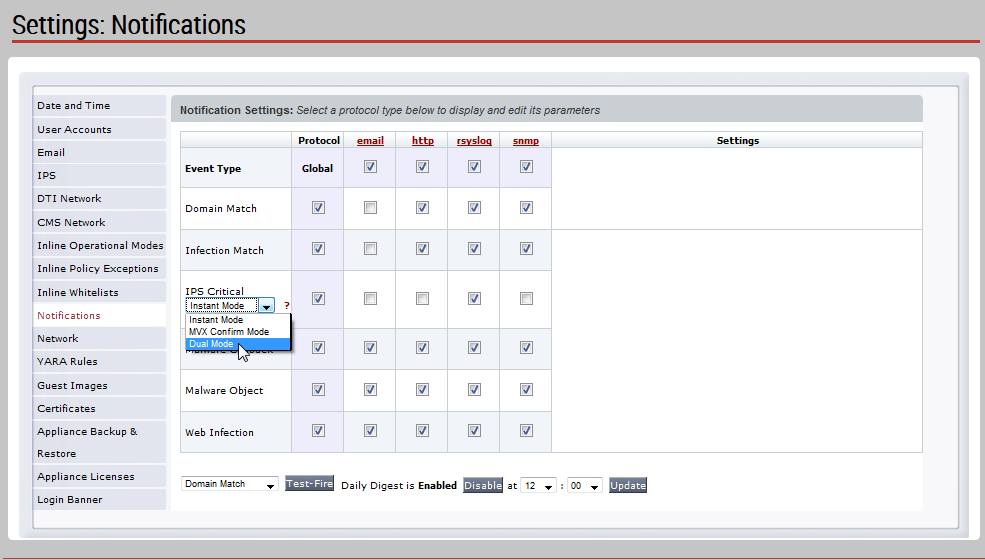
Choose Settings > Notifications to display the current configuration of event notifications.
In the Event Type column, select the IPS event notification the delivery mode.
instant—Send notification only when an IPS event is detected. This is the default value.
confirmation—Send notification only when an attack has been confirmed (either positive or negative).
dual—Send notifications both when an IPS event is detected and when an attack has been confirmed.
When you first activate IPS features, we recommend that you use dual mode.
Next step in setting up IPS
Go to Configuring notification of inline packet Inspection process state changes (CLI). You cannot configure this option from the Web UI.
Configuring IPS event notification mode (CLI)
This topic describes how to use the CLI to configure when IPS event notifications are sent for an IPS platform.
When you first activate IPS features, we recommend that you use dual delivery mode for IPS event notification instead of the default instant delivery mode. The dual mode enables you see both detection and confirmation of IPS events. For more information about all delivery modes, see IPS event notifications.
Prerequisites
Log in to the appliance CLI as Operator or Admin.
Configure FireEye notifications for IPS events. For more information, see Configuring IPS event notification methods (CLI).
Procedure
To configure when IPS event notifications are sent:
Enable the CLI configuration mode.
hostname > enable hostname # configure terminalConfigure the delivery mode.
instant—Send notification only when an IPS event is detected. This is the default value.
confirmation—Send notification only when an attack has been confirmed (either positive or negative).
dual—Send notifications both when an IPS event is detected and when an attack has been confirmed.
When you first activate IPS features, we recommend that you use dual mode.
hostname (config) # fenotify preferences ips dualVerify your changes.
hostname (config) # show fenotify preferences Notification customized settings: IPS delivery mode: dual HTTP(s) notification using fenet proxy: yes Rsyslog notification Stripping off line feedback: yesSave your changes.
hostname (config) # write memory
Next step in setting up IPS
Go to Configuring notification of inline packet inspection process state changes (CLI). You cannot configure this option from the Web UI.