Before you begin
Create a Trellix IPS Custom Attack definition and in the Matching Criteria section and select tcpip-machine as the Software Package.
Task
-
Click
Signature-<Signature ID> tab.
The Signature Details section is visible.
-
Add a comparison with at least one condition. Do the following:
-
Click
Condition 1 so that it is highlighted.
Creating a condition 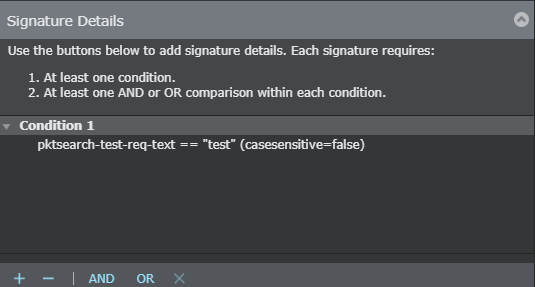
-
Click
AND.
The Add ADD Comparision dialog box opens.
Adding comparators 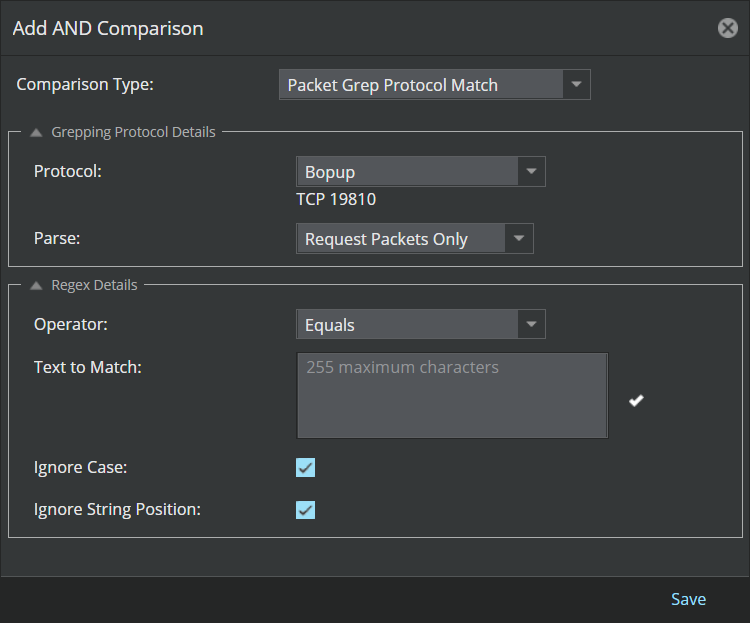
- Select Packet Grep Protocol Match from the Comparison Type drop-down menu.
- Select the protocol name that you defined from the Protocol drop-down menu.
-
Select the signature search direction from the
Parse drop-down menu. The choices are as follows:
- Request Packets Only
- Response Packets Only
- Select the regular expression matching criteria as Equals or Does NOT equal from the Operator drop-down menu.
- Add a pattern to match in the Text to Match text box.
- Optionally, click the Ignore Case check box if you want the pattern to be matched regardless of [letter] case.
- Optionally, click the Ignore String Position check box.
- Click Save after adding the condition details. Your comparison appears under Condition 1.
-
Click
Condition 1 so that it is highlighted.
- Click Update in the attack editor window.
- Click Save in the Custom Attacks window.