To create the attack definition for this example:
Task
-
Select
Policy → <Admin Domain Name> → Intrusion Prevention → Policy Types → IPS. Click
Custom Attacks.
The Custom Attack Editor opens with the existing Custom Attacks listed on the Native Trellix IPS Format tab.
-
Click
 .
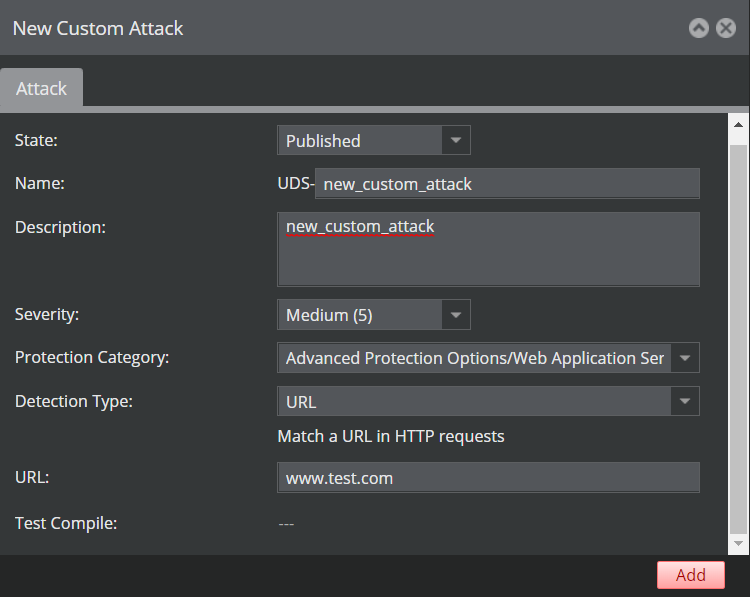
The New Custom Attack interface opens.
.
The New Custom Attack interface opens. -
In the
Name field, type a new name for your attack.
The letters "UDS" (user-defined signature) are appended to the front of the name upon completion when you save it in the Manager server.
- Type a description for your attack. This area can be used for your notes or other specific information pertinent to your new attack.
- Select Advanced Protection Options/Web Application Server Protection as the Protection Category.
- Select URL from the Detection Type list.
-
Enter the
URL that is to be detected, then click
Add.
- In the Matching Criteria section, the protocol is automatically selected as HTTP.
- Select Software Package (OS) as the Criterion.
- Select iis from the Software Package list .
- Select windows from the Operating System list and then click Add.
-
Verify that both HTTP and IIS appear in the Matching Criteria table.
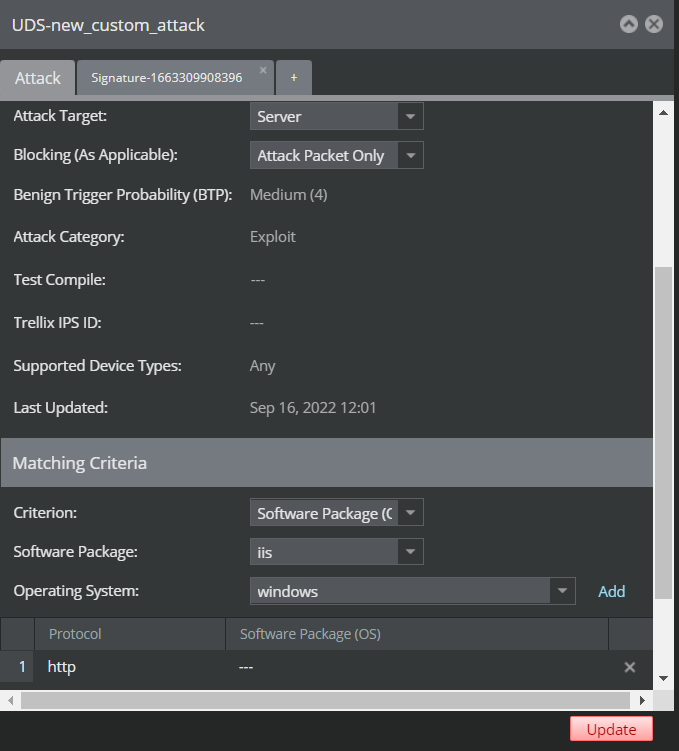
- Click Update.
- Attack details configuration is complete. Continue to create signature.