The changes made on the Manager interface are also reflected on Sensor CLI. To view the status on the Sensor, enter status command.
Task
- To enable the Deassert mode, click Devices → <Admin Domain Name> → Devices → <Device Name> → Troubleshooting → Layer 2 Bypass.
-
In the
Layer 2 Pass-Through Monitoring section, select
Deassert in the drop-down list against
Layer 2 Mode.
Note
The Deassert mode is displayed only if layer 2 mode is previously set to Assert mode.
- Check ARP Spoofing to enable it on the device.
-
Click
Save.
Once applied, you can view the number of critical faults and current mode in the Layer 2 Pass-Through Status dialog at the bottom of the screen.
Layer 2 Settings window 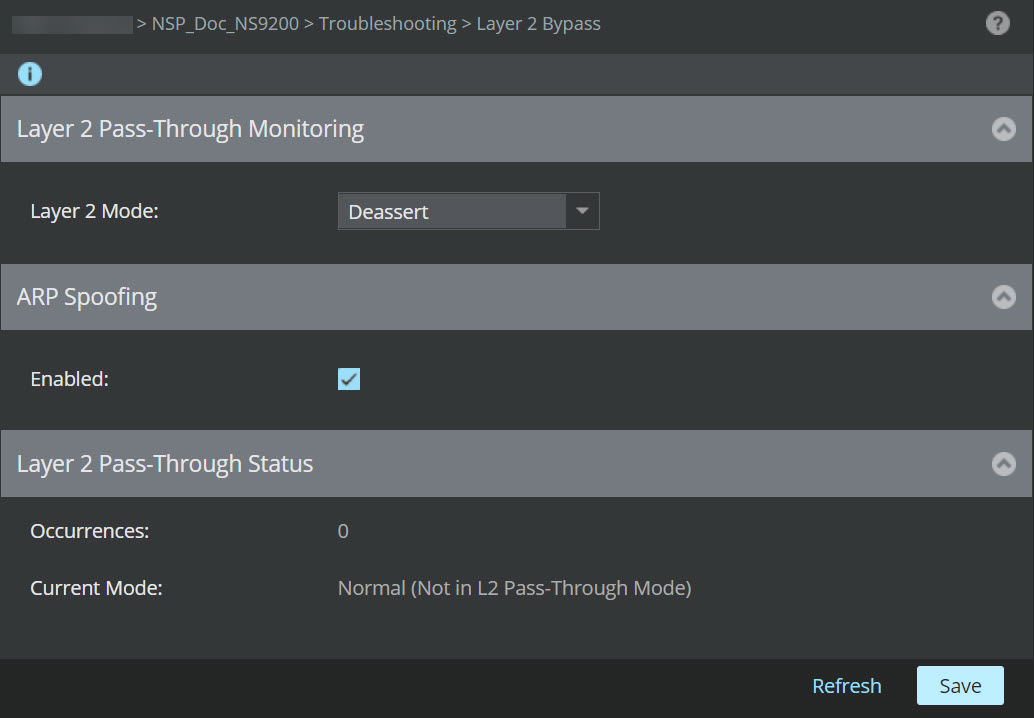
Note the following status fields:
- Occurrences: Displays the current number of threshold-breaching events
- Current Mode: Displays the current mode of the device. Normal means that layer 2 pass-through mode is not enabled in the device. L2 Pass-Through Mode means pass-through mode is enabled.
Note
To view the status of Deassert mode for Sensors in a stack, Click Devices → <Admin Domain Name> → Devices → <Device Name> → Member Sensors → <Stackname-node id> → Troubleshooting → Layer 2 Bypass
Note
The Manager interface does not allow you to move to Deassert mode when the layer 2 mode is set to ON/OFF.