By default, the Inherit Settings checkbox is enabled, so settings done at the global level are inherited by all NTBA Appliances in this domain (and child admin domains). The Auto-Classification Settings options are available only at the Global level and are inherited by all devices.
Task
-
Select
Devices → <Admin Domain Name> → Global → NTBA Device Settings → Device Settings
→ Setup → EIA Integration.
The EIA Integration page is displayed.
Note
The settings done at the parent admin domain level are inherited by default by its child domains.
-
Select the
Enable EIA Integration checkbox to enable the feature.
Enable EIA Integration page globally 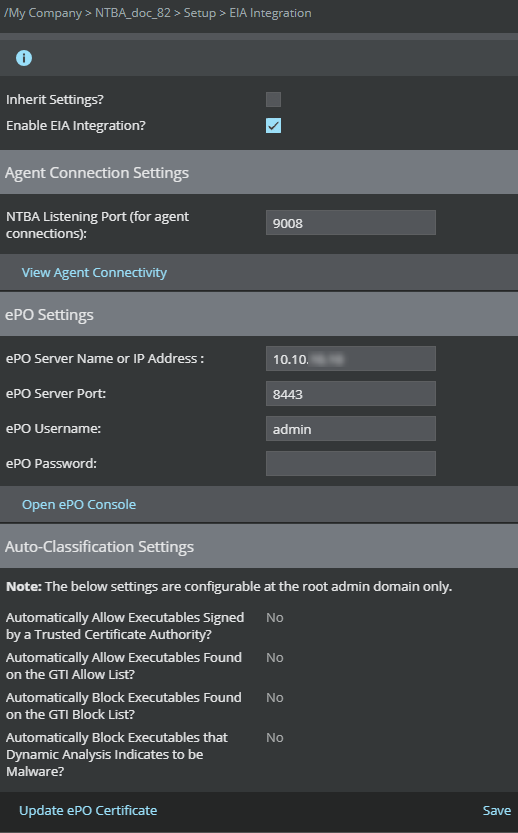
Field descriptions Field Description Agent Connection Settings The NTBA Listening Port is the port on which the NTBA Appliance listens for incoming connections from endpoints running McAfee EIA. It is pre-populated with the value used by default by the agents. You can edit this field by specifying a port number between 0 and 65535. At a device level, click View Agent Connectivity to verify EIA connectivity with the configured NTBA device.
ePO Settings This section defines the parameters used to connect with the ePO server and exchange the certificates used to authenticate and secure agent communication with the NTBA Appliance. - ePO Server IP Address: Displays the IP address of the ePO server
- ePO Server Port: This field is pre-populated with the value used by default by the ePO server. You can edit this field by specifying a port number between 0 and 65535.
- ePO User Name: Type the user name to log on to the ePO console.
Note
ePO user must enable the Allow Download of Certificates present in the Endpoint Intelligence category of user permissions.
- ePO Password: Type the password to log on to the ePO console.
- Open ePO Console: Click to configure the ePO settings from here.
Auto-Classification Settings This section provides options to automatically allow and block executables in which Trellix is confident of their posture. It provides the following options: - Automatically Allow Executables Signed by a Trusted Certificate Authority: If the executable is found signed by a trusted CA or if there is a signer name, it is allowed. This is enabled by default.
- Automatically Allow Executables Found on the GTI Allow List: If GTI file reputation is clean, it is allowed. This is enabled by default.
- Automatically Block Executables Found on the GTI Block List: If GTI file reputation is malicious, it is blocked. This is disabled by default.
- Automatically Block Executables that Dynamic Analysis Indicates to be Malware: If dynamic analysis reports a file as malicious, it is blocked. This is disabled by default.
Note
Trellix recommends that you keep all auto-classification settings as enabled unless you want to investigate every executable manually.
Update ePO Certificate Click this button if there have been changes in the certificate on the ePO side to automatically update all NTBA Appliances in the admin domain node (and devices in the child admin node that are inheriting them). To check if McAfee EIA service is running on the NTBA Appliance, run the show endpointintelligence summary CLI command.
Note
ePO user must have the option 'Allow Download of Certificates' enabled in the Endpoint Intelligence category of user permissions.