To enable Telemetry in the Manager, perform the following steps:
Task
-
In the Manager, navigate to
Manager → <Admin Domain Name> → Setup → Telemetry.
The Telemetry page is displayed.
Telemetry page 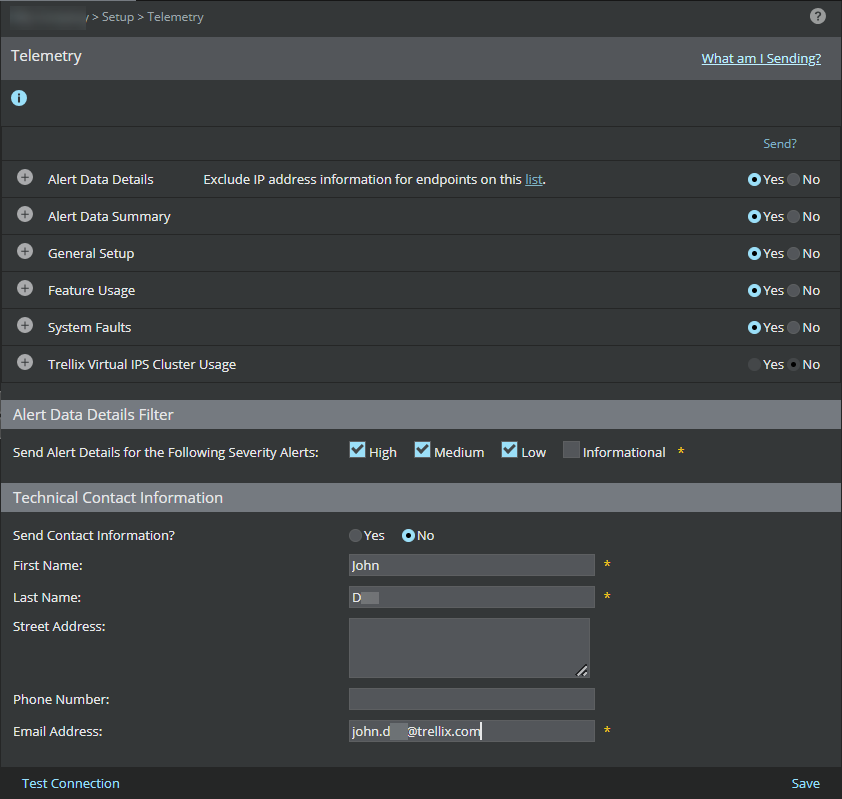
-
Select the
Alert Data Details,
General Setup, and
Feature Usage to be sent to Telemetry.
Note
The Alert Data Details, General Setup, and Feature Usage details are mandatory data that should be sent to the Trellix Insights when integration is enabled.
-
In the
Alert Data Details Filter, select the type of alert severity option to be sent.
The available options are:
- High
- Medium
- Low
- Informational
-
In the
Technical Contact Information, update the following fields to provide your contact information to
Trellix Labs.
- Send Contact Information?
- First Name
- Last Name
- Street Address
- Phone Number
- Email Address
- [Optional] To check whether communication to the GTI server is established, click Test Connection.
- Click Save.