After you create an HTTP Event Collection (HEC) token, you must enable the token to connect and run the Layer 7 Metadata Event Exporter feature on your Network Security appliance.
Prerequisites
Administrator or Operator access to the Network Security appliance.
An active subscription to the Splunk Enterprise server.
A connection to the Splunk Enterprise server.
Create the HTTP Event Collector token on the Splunk Enterprise serve. See Creating an HTTP Event Collector token on a Splunk Enterprise Server.
Log in to the Splunk Enterprise server using the Web UI.
Click Settings > Data Inputs.
The HTTP Event Collector page appears.
Click Global Settings.
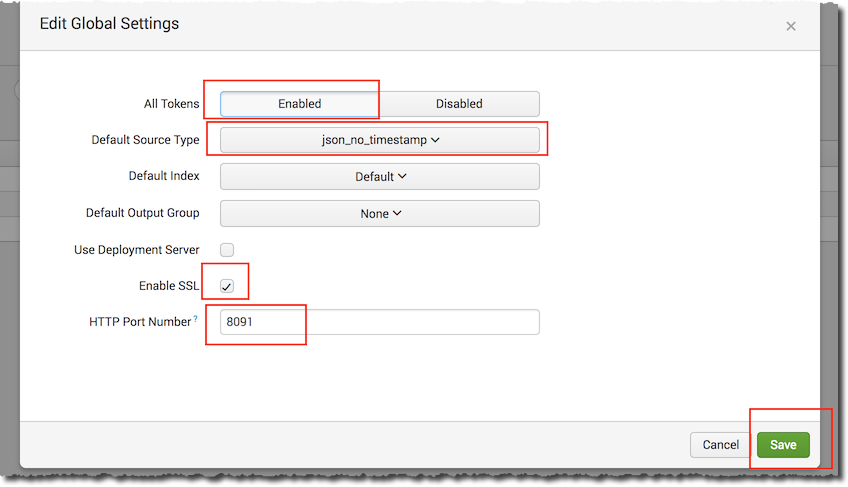
Select the global settings as indicated in the following table.
Note
The default index, default output group fields are optional
Field
Input
All Tokens
Enabled
Default Source Type
json_no_timestamp
Default index (optional)
By default, all events are stored in the main index. You can specify a different index by using: index = "<index_name>".
Default Output Group (optional)
Default is none. You can specify an output group to forward data.
Use Deployment Server
Default is unchecked, when your Splunk Enterprise server is a deployment client and receives events from the Network Security appliance. Check if your Splunk Enterprise server acts as a centralized configuration manager and sends updates to deployment clients.
Enable SSL
Select Enable SSL to have HEC listen and communicate over HTTPS rather than HTTP.
HTTP Port Number
Use the default HTTP port number or enter a custom HTTP port number to run HEC on a different port.
Click Save.