You can define blocks of addresses to be grouped together. By defining these blocks, the information on any alert that contains any IP address matching these blocks will not be sent to Trellix Labs.
To exclude IP address information for hosts:
Task
-
Go to
Manager → <Admin Domain Name> → Setup → Telemetry.
The Telemetry page is displayed.
-
Click the
list hyperlink within
Exclude IP address information for endpoints on this list. displayed in the
Alert Data Details section header.
The Exclusions dialog is displayed.
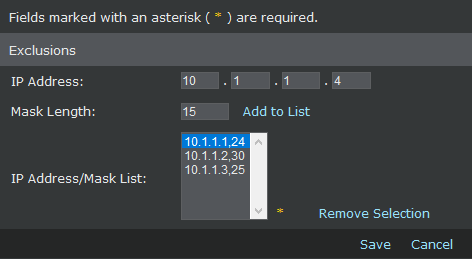
- Enter the IP address for exclusion in the IP Address field.
-
Enter the CIDR value for the mask in the
Mask Length field.
Note
The CIDR value should be between 0 to 32.
-
Click
Add to List.
The IP address, mask length gets added and is displayed in the IP Address/Mask List field.
Note
You can remove an item in the IP Address/Mask List by clicking Remove Selection.
- Click Save.