The vulnerability assessment scan results of an admin domain can be imported in an XML format from a location in the Manager's file system. You can reformat the scan results and save it to a specific location, so that the Manager automatically imports the result to be later used to determine alert relevance.
Note
The non-MVM report import feature is disabled if Alert Relevance feature is disabled in the Manager.
Task
-
Select
Manager → <Admin Domain Name> → Integration → Vulnerability Assessment → Non-MVM Report Import.
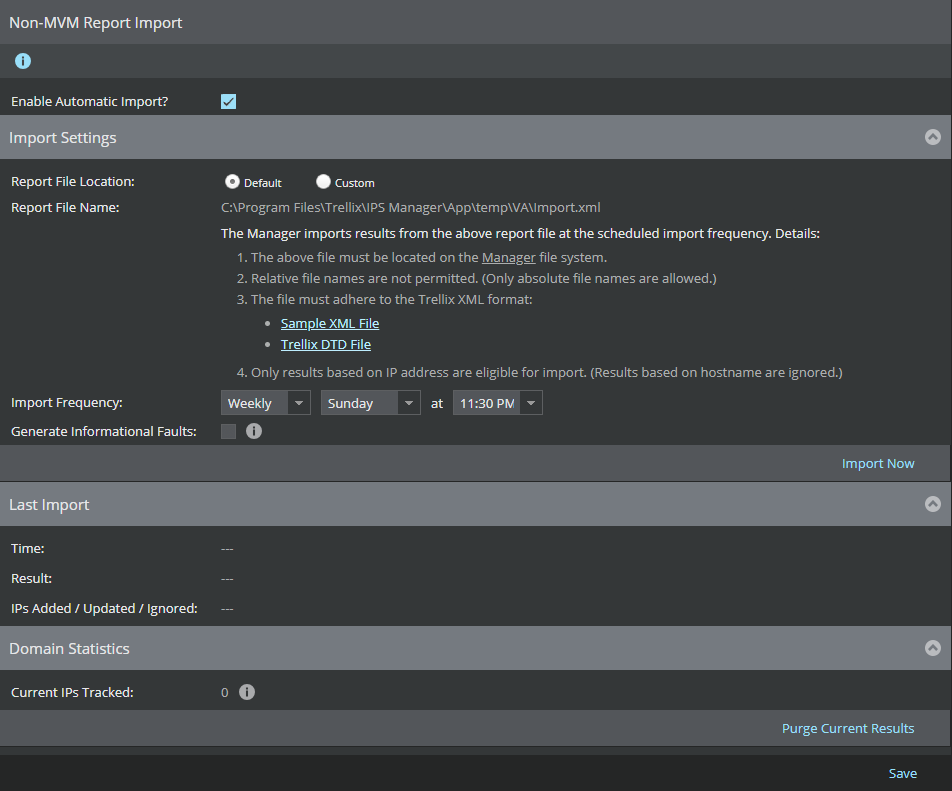
The Non-MVM Report Import page is displayed.
-
Select the
Enable Automatic Import? checkbox.
Note
By default, this option is not selected.
The Import Settings panel is displayed with the following fields.Option Definition Report File Location Default: Specifies that the file to be imported is available in the default local location Custom: Specify a unique file to be imported for each admin domain.
Report File Name This text field displays the default location path of the report file to be imported.
Note
When the Default option is selected for the Report File Location, this text field is disabled and, therefore, cannot be modified. When the Custom option is selected, this text field is enabled and you can specify a unique file name for the specific active directory.
In an enterprise environment, the default file can be used across all admin domains. In environments such as MSSP where a unique active directory is created for each customer, a unique file can be used for each active directory.
Sample XML File Click on the Sample XML File hyperlink to view the sample file located in the Manager file system, which is in the same directory as the default import file. This sample file can be used as a file template for the XML file. Trellix DTD File Click on the Trellix DTD File hyperlink to view the GenVulReportFlat.dtd located in the Manager file system. It provides the details of the XML rules for the XML format. Import Frequency To configure the frequency of import, select the following options: - Weekly: For weekly import, select the day (Example:Sunday) from the drop-down list, and select the weekly time for import from the at drop-down list.
- Daily: For a daily report, select the daily time for import from the
at drop-down list.
Note
The import frequency coincides with the server time.
Generate Informational Faults Select the Generate Informational Faults to generate an informational fault when the import attempt is successful. - Click Import Now to import the results from the specified results file location.
Sample XML file
The sample XML file can be used an XML file template for importing the scan result. The sample XML file contains the following root elements.
- <Report Summary> - Contains the summary of time and security vulnerability of the scanned vulnerability report
- <Host Summary> - Contains the summary of the host in the scanned vulnerability report
- <HostVulnerabilities> - Contains the host vulnerability details of each vulnerability
The following table explains the list of child elements under each root element.
| XML child elements | Description |
|---|---|
| <Time summary> | |
| <Report Time> | The date when the scan was performed
Example: 09.10.2015 (MM.DD.YYYY) |
| <ScanStartTime> | The starting time of the scan
Example: 09.10.2015 (MM.DD.YYYY) 18:08:17 (HH:MM:SS)
|
| <ScanEndTime> | The end time of the scan
Example: 09.10.2015 (MM.DD.YYYY) 18:49:37 (HH:MM:SS) |
| <ScanElapsedTime> | The duration of the time elapsed since the scan was performed
Example: 0 day(s) 00:41:19 (HH:MM:SS) |
| <SecurityVulnerability Summary> | |
| <TotalNumberOfVulnerabilities> | The total number of vulnerabilities found in the scan |
| <HighSeverityVulnerabilities> | The total number of high severity vulnerabilities found during the scan |
| <MediumSeverityVulnerabilities> | The total number of medium severity vulnerabilities found during the scan |
| <LowSeverityVulnerabilities> | The total number of low severity vulnerabilities found during the scan |
| <InformationalVulnerabilities> | The total number of informational vulnerabilities found during the scan |
| <Host Info> | |
| <HostIP> | IP address of the host |
| <HighSeverityVulnerabilities> | High severity vulnerabilities found in the host |
| <MediumSeverityVulnerabilities> | Medium severity vulnerabilities found in the host |
| <LowSeverityVulnerabilities> | Low severity vulnerabilities found in the host |
| <InformationalVulnerabilities> | Informational vulnerabilities found in the host |
| <SingleVulnerability> | |
| <HostIP> | IP address of the host |
| <OriginalDescription> | The original description of the vulnerability |
| <PortNumber> | The port number of the host |
| <Protocol> | The protocol used for communication |
| <ServiceName> | The service name |
| <Severity> | The severity of the vulnerability |
| <VulnerabilityDescription> | The description of the vulnerability |
| <Solution> | The solution for the vulnerability |
| <RiskFactor> | The risk factor, if exists |
| <CVE> | The CVE ID of the vulnerability |
| <BID> | BID ID for the vulnerability, if any |
| <OtherRef> | Other references, if any
Example: OSVDB:94 CWE:200 |