The Network Security Alerts page includes information about each malware attack and infection as well as details useful to analysts.
For information about navigating the Network Security Alerts pages, see Viewing alerts and events using the Web UI.
In the case of a Web Infection, the Alerts page can show how the source IP was initially infected.
In the following example, an infection comes from an Exploit.Browser attack that included another dropper binary. The dropper is identified as a particular malware family and the callback is identified as being from the same malware family.
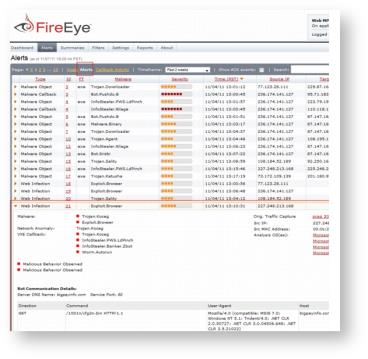
Because there is a callback and it is matched to an actual asset, the asset is determined by the appliance to be compromised.
Analysts can drill down further to understand how the malware is working.
In the following example, a malicious PDF detonates across all four Guest Image profiles:
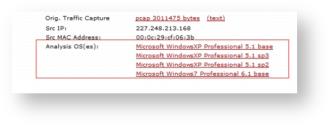
If it was not a PDF, it would have only detonated across one of the four Guest Image profiles. In this case, the PDF was used as a heap spray attack against Acrobat Reader. A heap spray attack is a method used by attackers to take control of a victim machine's normal processing and allow processing of the malicious code. Heap sprays generally trigger the most indicators from Windows XP.
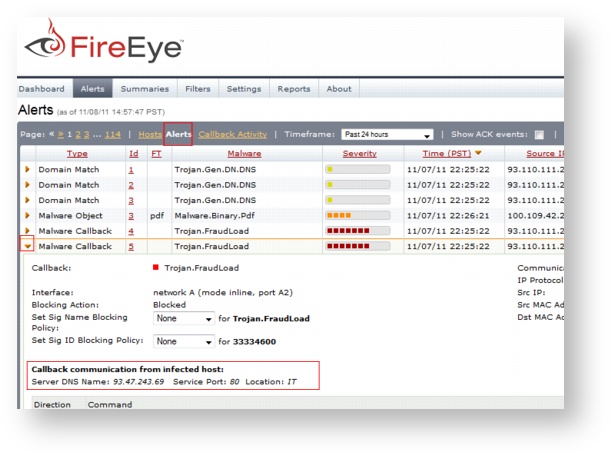
Analysts can review additional information to find the initial infection URL that contained the dropper. For malware callbacks, the Network Security appliance provides Communication Callback information. The Network Security File Extraction feature collects all files created or modified during analysis in a zip file available for further forensics from the VM Capture section of the Alerts page (displayed when an incident row is expanded, in the topmost Events section of the display).
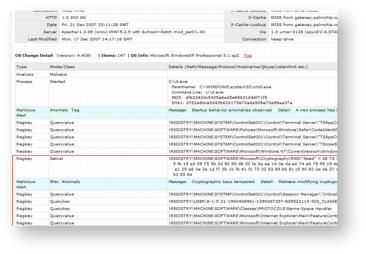
The OS Change Detail section of the expanded Alerts page reveals when dropper code was downloaded and executed and what files were affected. In the following example, the alert displays how the dropper tried to maintain persistence within the MVX engines. All these indicators help analysts determine whether the asset was compromised in the same way. For more information about all the fields and items on the Alerts page, see Monitoring alerts and hosts.
Sometimes, all callback traffic generated by the dropper code is identical. In this case, if the analysis has a host-based intrusion detection system deployed enterprise-wide, forensics experts can use the Network Security analysis results and incident reporting to write rules that will generate additional alerts based on this callback information. When the Network Security software generated the initial infection URL alert, it simultaneously created an internal dynamic rule, locally, within the appliance. See also Custom rules and YARA rules for more information.
In some cases, there is the same type of callback traffic, but the Network Security software is actually identifying a local infection match. It is identified based on the same GET requests for the same executable file going to the same host.
Normally, this event would be listed as low severity; however, when it is combined with other alert-level events, it might be listed as high severity.
In the case of an Exploit.Browser, some events appear to be malicious, but it can be difficult to tell. In order to know if an exploit is truly malicious, analysts need to review the details of the infection.
From the Network Security Alerts page, look to see if the event used ASPX scripting, or if it loads a DLL from a URL. Notice whether the Web browser generated exploit code or if application data was loaded in the local cache. Scroll down in expanded details to see whether data was returned internally using a Honey Binary.
Note
A Honey Binary is when a Network Security MVX engine fetches Web content that has been cached on the appliance; any fetch that returns nothing allows the Network Security software to determine that the fetch matches a GET for binary content. Therefore, the Network Security software will return a benign binary that is called a honey binary. This means that the Network Security software does not see the GET occur on the actual network. Instead, it was returned locally within the Network Security software appliance.
From an analyst's perspective, it is important to determine if an end asset was actually compromised. A good rule of thumb is that if you see file system rights in the OS Change Details report and they all map to honey binaries, then the exploit code would have been delivered to the end assets but the end assets would not necessarily have been compromised. If they were, they would have fetched the same exact content over the network. The appliance may have cached that code instead of the honey binaries.
Verify to see whether other file system rights map to different MD5s and different SHA1s to determine whether or not the end asset was actually compromised. This information can help analysts determine if they are dealing with an attempted attack or a full exploit.
For Malware.Binary incidents, notice whether affected hosts downloaded multiple different binaries but a callback was generated on only one of them. It is sometimes possible that the other binaries delivered did not actually exploit the end asset, but the Network Security software reveals that there has been at least one exploit because there is at least one callback.
When reviewing incident information, first determine the severity of the event. For information about the incident severity, see Incident severity. If there is a callback, then the end asset was probably compromised.
It also important to keep in mind that when malware is identified as common malware, such as a Trojan.BAT, this is probably not an APT attack. However, this does not mean that it definitely is not an APT. Some APTs do use common malware names. In order to determine if this is truly an APT, an analyst must review the information provided about how the malware behaved and operated in the OS.
Some incident details can be vague. A Malware.Binary event can appear to be malicious, but it might not have any callback traffic generated from within the MVX engine or from an actual asset. If it is a legitimate infection, it could be an APT attack. Because the Network Security software does not assign any specific monikers, there is a higher probability that such an incident is an APT attack.
The Network Security software allows analysts to see when an executable file was delivered; if it corrupted a root file system (a major concern) it may have ultimately loaded a DLL. The executable might register a new Windows service, which is another red flag. It is important to note that properly signed binaries are whitelisted, which is one way that legitimate installers are filtered out.
When interpreting Callback traffic, there may be an abundance of callback traffic reported, including the initial infection. It is sometimes the case that the asset was compromised at the outset by the initial event. All of the callback information displayed is often the result of an asset being loaded with additional malware from the initial CnC channel.
The Network Security software employs extra resources to detonate CnC content using multiple Guest Image profiles. Additionally, the Network Security software displays the multiple callbacks and identifies specific callbacks with monikers—in this case, Trojan.Outbreak. From this level of details, analysts can again see whether the callback generated a heap spray attack.
In the case of a single callback, there may be no OS Change reports because nothing was detonated. Sometimes the evidence suggests that the asset was fully compromised because the callback was based off of a full GET, which is why it may be assigned high severity. It is possible, in this case, that a system was infected outside the enterprise and reentered the corporate network where the callback was detected.
In other callback instances, there may not be an OS Change report because it is impossible to tell if an asset was compromised based only on the DNS. It is likely, but in order to confirm it, analysts must compare when the DNS record was first added to the database relative to when the asset first generated the DNS request. If there is a large gap between these two criteria, it is likely that the attacker’s infrastructure changed. If so, there may be remnants of old queries. Although these queries could be from a previously compromised workstation, signals might still be sent to CnC servers that are no longer live. This would then be considered orphaned malware. Generally, in these cases, there would be more than one event. Therefore, it is more likely that an exploit code was delivered through inline Web content for an infrastructure that no longer exists.