The Manager Appliance front panel contains ports, LED lights for status, and buttons to perform operations.
An optional lockable bezel is included with the Manager Appliance, which can be installed to cover the front panel.
The front panel of the SYS-121C-TN10R system features 10x 2.5" Hot-swap Drive Bays. These bays are a hybrid design, supporting NVMe, SAS, or SATA drives for high-density storage access.

Item | Description | Function |
|---|---|---|
1 | USB ports | 2x USB 2.0 Type-A ports for connecting peripherals like a keyboard or mouse. |
2 | Power button | Turns the system power ON or OFF. |
3 | UID (Unit Identifier) button | Toggles the blue UID LED on the front and rear of the chassis, used to physically locate the specific server in a rack. It can also be used as a BMC reset button (see the manual for the exact procedure). |
4 | 10x drive bays | Used for read/write activity on the hot-swap drive bays. |
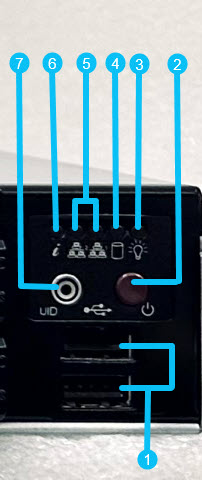
The control panel section typically includes the following buttons, ports, and LED indicators:
Item | Description |
|---|---|
1 | USB ports |
2 | Power button |
3 | Power status LED |
4 | HDD/SSD Activity LED |
5 | Port activity LEDs (NIC1 or NIC2) |
6 | System fault LED |
7 | UID (Unit Identifier) |