Port clustering for an NS9300 Sensor in tap mode
In earlier releases, for an NS9300 Sensor connected in tap mode, due to the existing design of traffic distribution, some attacks were not detected. The TCP handshake may come out of order due to which the complete flow is not created for parsing in the Sensor.
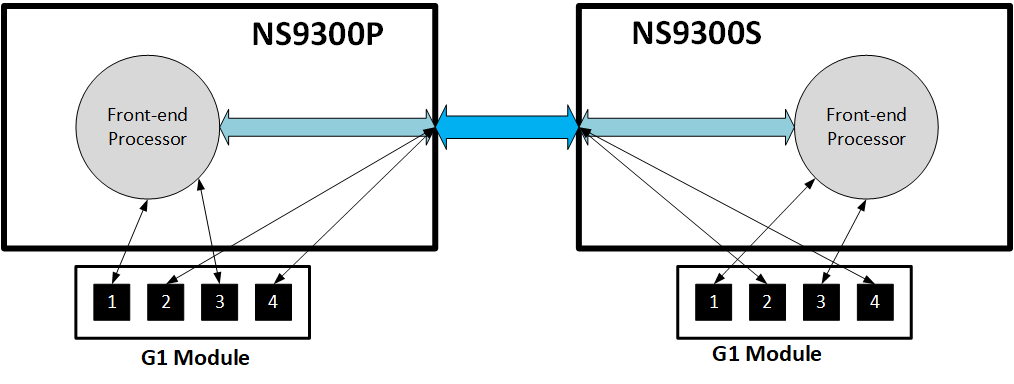
The following diagram shows the existing design for traffic distribution to the Sensor. The distribution of traffic between the monitoring ports is such that it directs the traffic from odd ports (G1/1, G1/3, G1/5, G1/7) to the local front end of the Sensor, and the traffic from even ports (G1/2, G1/4, G1/6, G1/8) is directed to the remote front end of the Sensor.
With this release of 10.1, to improve the attack detection, the traffic distribution between the monitoring ports is redesigned. The monitoring ports are paired such that the traffic from the odd port pairs (G1/1, G1/2) and (G1/5, G1/6) is directed to the local front end of the Sensor, and the traffic from the even port pairs (G1/3, G1/4) and (G1/7, G1/8) is directed to the remote front end of the Sensor. Port cluster in tap mode is configured in a manner where the traffic is being forwarded to the same front end of the Sensor as shown in the following diagram. Port clustering is applicable to ports G1, G2, G3, G5, G6, and G7.
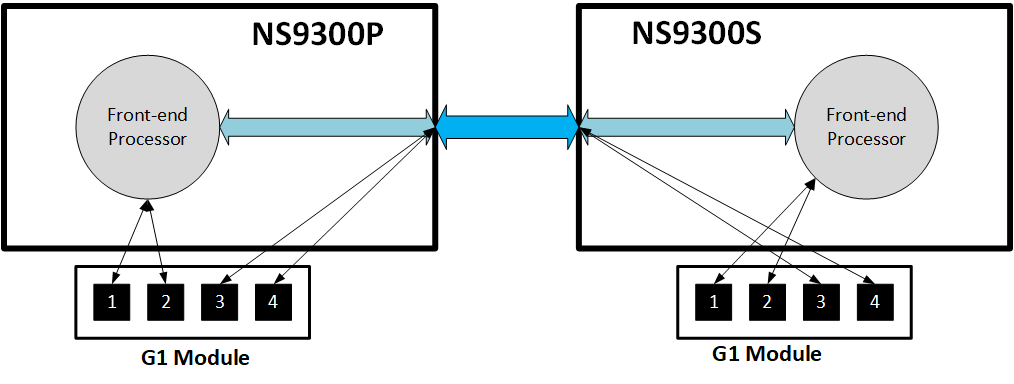
For more information about port cluster configuration for an NS9300 Sensor in tap mode, see McAfee Network Security Platform NS-series Sensor Product Guide.
Gateway Anti-Malware Engine with Public GTI server through proxy
Currently, if the proxy settings are configured in your network, the Gateway Anti-Malware engine cannot query the GTI server through the proxy server.
With this release of 10.1, if the proxy settings are configured in your network, the Gateway Anti-Malware engine is able to query the GTI server through the proxy server.
To configure proxy settings in the Manager, go to Manager → <Admin Domain Name> → Setup → Proxy Server. For more information, see McAfee Network Security Platform Product Guide.
Encryption of malware communication channel between Network Security Platform and Advanced Threat Defense
Starting with Advanced Threat Defense version 4.10.0 and Sensor software version 10.1.5.41 (NS-series) and 10.1.7.1 (Virtual IPS), the SSL malware communication channel between Advanced Threat Defense and the Sensor is encrypted by default. If the SSL malware communication channel is not encrypted, Advanced Threat Defense and Sensor cannot communicate with each other.
Consider the following table for various scenarios of the malware communication channel between Network Security Platform and Advanced Threat Defense where actions are required to be taken for a seamless upgrade:
Note
The malware communication channel of Advanced Threat Defense and the Sensor should be the same to communicate with each other.
Note
Before Sensor upgrade if the encryption status of SSL malware communication channel was disabled, on upgrade the encryption status of SSL malware communication channel changes to enabled by default.
Note
Before Advanced Threat Defense upgrade if the malware communication channel was TCP or SSL with encryption status disabled, on upgrade the malware communication channel changes to SSL with its encryption status enabled by default.
Scenario 1
When both the Sensor and Advanced Threat Defense are upgraded to 10.1.5.41 (NS-series), 10.1.7.1 (Virtual IPS), and 4.10.0 respectively:
| Malware communication channel on the Sensor | Sensor encryption status | Malware communication channel on Advanced Threat Defense | ATD encryption status | Status of the communication channel | Action to be performed |
|---|---|---|---|---|---|
| TCP | N/A | SSL | Enabled | Communication channel will break. | You should manually switch to TCP channel in the Advanced Threat Defense CLI by using the set nsp-tcp-channel enable CLI command. |
| SSL | Enabled | SSL | Enabled | Communication channel will not break. | N/A |
Scenario 2
When you upgrade the Sensor to 10.1.5.41 (NS-series) and 10.1.7.1 (Virtual IPS) before you upgrade Advanced Threat Defense to 4.10.0 or use an older version of Advanced Threat Defense:
| Malware communication channel on the Sensor | Sensor encryption status (After upgrade) | Malware communication channel on Advanced Threat Defense | ATD encryption status (Before upgrade) | Status of the communication channel | Action to be performed |
|---|---|---|---|---|---|
| TCP | N/A | TCP | N/A | Communication channel will not break. | N/A |
| SSL | Enabled | SSL | Disabled | Communication channel will break. | You should manually enable encryption in the Advanced Threat Defense CLI by using the set nsp-ssl-channel-encryption enable CLI command as the new Sensor image no longer supports the set amchannelencryption enable CLI command. |
| SSL | Enabled | SSL | Enabled | Communication channel will not break. | N/A |
Scenario 3
When you upgrade the Advanced Threat Defense to 4.10.0 before you upgrade the Sensor software version to 10.1.5.41 (NS-series) and 10.1.7.1 (Virtual IPS) or use an older version of the Sensor:
| Malware communication channel on the Sensor | Sensor encryption status (Before upgrade) | Malware communication channel on Advanced Threat Defense | ATD encryption status (After upgrade) | Status of the communication channel | Action to be performed |
|---|---|---|---|---|---|
| TCP | N/A | SSL | Enabled | Communication channel will break. | You should manually switch to TCP channel in the Advanced Threat Defense CLI by using the set nsp-tcp-channel enable CLI command. |
| SSL | Disabled | SSL | Enabled | Communication channel will break. | You should manually enable encryption in the Sensor by using the set amchannelencryption enable CLI command. |
| SSL | Enabled | SSL | Enabled | Communication channel will not break. | N/A |