For information about changing the default submission interface, see the chapter “Performing the Initial Configuration” in the Threat Management Platform Deployment Guide for your software release.
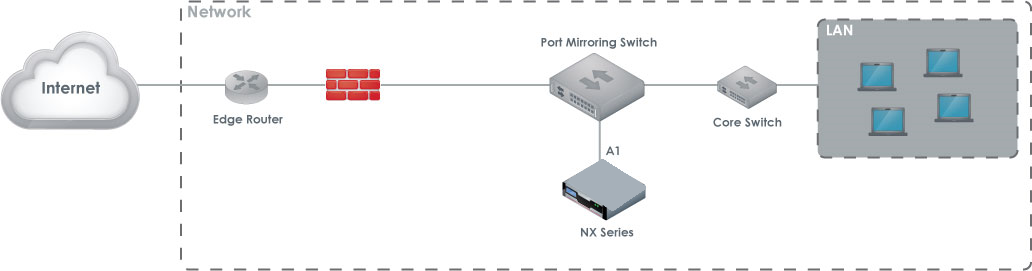
Port mirroring deployment, also known as Switch Port Analyzer (SPAN) packet capture, is usually the least expensive option in a low-traffic network environment. To set up port mirroring, you configure a router or switch with port mirroring capability to forward a copy of incoming and outgoing traffic passing between selected ports to SPAN ports on the switch. Then connect the SPAN ports to the appliance.
Port mirroring has the following limitations:
Heavily used networks may result in dropped packets that are not passed to the NX Series appliance.
Port mirroring is active packet duplication. The router or switch uses its processing power to mirror the network packets and pass these packets to the NX Series device. In a heavily used network, the network quality and response times tend to degrade.
The router or switch must be configured to provide port-mirrored data to the NX Series appliance. Maintenance costs for this configuration can be higher than other configurations.
Detected malware cannot be prevented from accessing your network.
SPAN port connectivity issues may cause delays in your deployment. You may need to add a few days to troubleshoot the connectivity issues.
The following diagram illustrates the port mirroring deployment in a typical network topology.
Caution
You must configure the SPAN port correctly and test it to make sure that the mirroring ports are passing all of the traffic you want to monitor. This usually requires an administrator with networking expertise who can set up the SPAN port and run TCPDump or WireShark to monitor the traffic and verify that there is bi-directional TCP port 80 (HTTP) traffic passing through the port.
Prerequisites
Before connecting the NX 4600 appliance to your network:
Make sure that the connecting routers or switches do not provide data output greater than 1 Gbps for RJ45 ports and 10 Gbps for SFP+ ports.
Determine which ports on your routers or switches provide ingress and egress data
Cabling
Connect the appropriate cables to the NX 4600 appliance’s ports as follows:
ether1: Connect one end of the cable to the NX 4600 appliance’s ether1 port, and connect the other end to your LAN-facing switch. This will enable you to access the appliance’s Web UI.
pether3: Connect one end of the cable to the NX 4600 appliance’s pether3 port, and connect the other end to your SPAN device.
You can monitor more network segments by connecting additional SPAN devices to pether4-14.