For information about changing the default submission interface, see the chapter “Performing the Initial Configuration” in the Threat Management Platform Deployment Guide for your software release.
Test Access Point (TAP) uses a TAP device to provide a real-time duplicate copy of the network traffic through the network.
Test Access Points have the following limitations:
You must purchase a separate TAP device to deliver packets to the NX Series device.
A TAP deployment does not block malware from accessing your network.
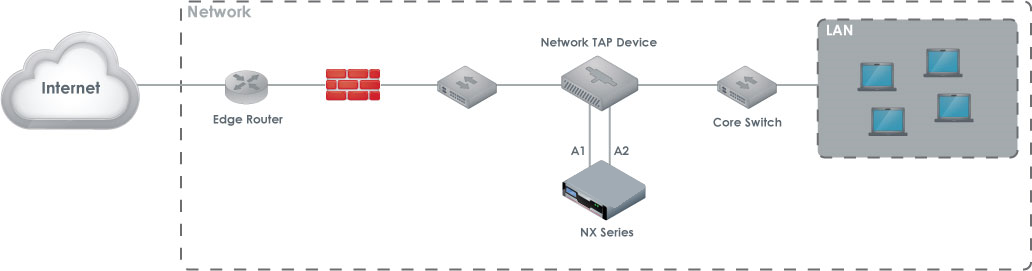
To deploy the Trellix NX Series appliance using a TAP device, you first connect the TAP device inline to your network. You then connect the Trellix NX Series monitoring ports to the ingress and egress ports on the TAP device. The following diagram illustrates the TAP deployment in a typical network topology.
Prerequisites
Before connecting the NX 4600 appliance to your network:
Make sure that the connecting routers or switches do not provide data output greater than 1 Gbps for RJ45 ports and 10 Gbps for SFP+ ports.
Determine which ports on your routers or switches provide ingress and egress data
Cabling
Connect the appropriate cables to the NX 4600 appliance’s ports as follows:
ether1: Connect one end of the cable to the NX 4600 appliance’s ether1 port, and connect the other end to your LAN-facing switch. This will enable you to access the appliance’s Web UI.
pether3: Connect one end of the cable to the NX 4600 appliance’s pether3 port, and connect the other end to your TAP device.