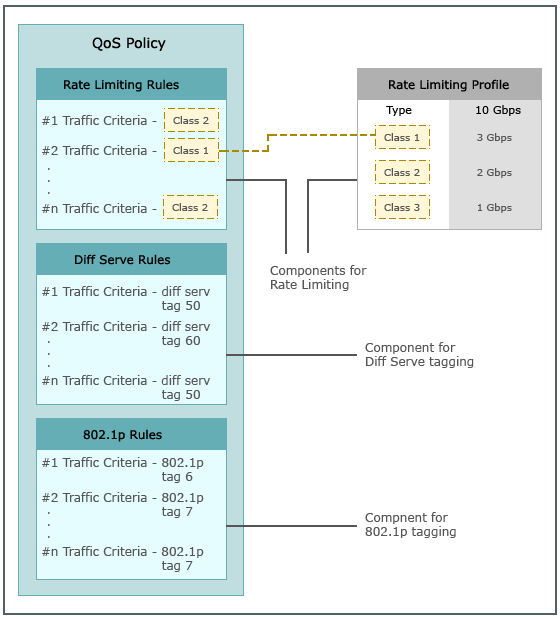
A Rate Limiting profile is an object that you use to distribute the throughput capacity of a monitoring port among various queues called classes. In each Rate Limiting rule, you specify a class. As a result, a specific traffic is mapped to a specific class. To use the Rate Limiting feature, you must define the QoS rules for Rate Limiting and also create the Rate Limiting profiles.
Consider a 1 Gbps monitoring port 1A. In a Rate Limiting profile, you distribute this 1Gbps among classes 1 through 7. Consider that you allocated 600 Mbps to class 1. In a Rate Limiting QoS rule that identifies HTTP traffic, you specify the class as class 1. When you assign this Rate Limiting profile and QoS policy to port 1A, the Sensor classifies HTTP traffic exiting 1A as belonging to class 1. This in effect means that the Sensor allows up to 600 Mbps of HTTP traffic to egress out of port 1A and drops any HTTP traffic beyond 600 Mbps.
Consider a 100 Mbps monitoring port 2A. To apply a Rate Limiting profile on this port, you need to create a Rate Limiting profile of type 100 Mbps. In this profile, you distribute the 100 Mbps among classes 1 through 7. Assume that you allocated 60 Mbps to class 1. Regarding the QoS policy for port 2A, you can apply the same QoS policy applied on 1A (the one that classifies HTTP traffic as class 1). Now, using the same QoS policy but different profiles, you can limit HTTP traffic on 1A to 600 Mbps and to 60 Mbps on port 2A. This is how the profile-based approach facilitates reuse of QoS policies.