Prerequisite:
You must make sure the Fail-Open module is fully powered off before you attempt to remove it from the chassis.
Note
Trellix recommends you power off the Fail-Open module before removing it from its slot. The module can be individually powered down by pressing the corresponding M1 M2 or M3 button for at least 4 seconds. If you replace a module with the same type, the replaced module will be active after insertion and does not require a reboot of the system.
Follow the steps in this section to power off and remove the Fail-Open module.
Steps:
Power off the Fail-Open module using the web interface or CLI command prompt.
If you are using the web interface, click the Rescue tab and check the Power Off checkbox in the System Restore section. To access the web interface, refer to the section Manage the fail-open switch through a web interface.
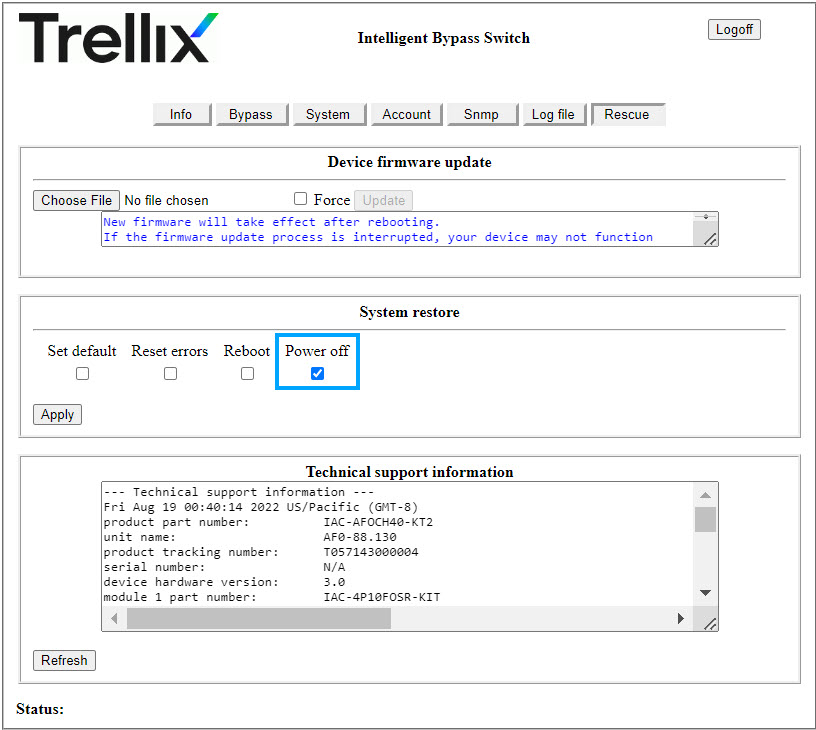
If you are using the CLI command prompt, type
power_offand press Enter. To access the CLI prompt, refer to the section Configure fail-open switch parameters.
When the Fail-Open module is powered off, remove the captive screws and slide it out of the chassis.