After you activate IPS processing on the platform and verify detection of IPS events, you should test the FireEye notifications for IPS alerts. You can test-fire IPS events from the Web UI or the CLI:
Testing IPS event notifications (Web UI)
Testing IPS event notifications (CLI)
Testing IPS event notifications (web UI)
This topic describes how to use the Web UI to test IPS event notifications.
Prerequisites
Log in to the appliance Web UI as Operator or Admin.
Configure IPS event notifications, as described in Initial configuration of IPS.
Apply IPS policies to the appliance monitoring interfaces, as described in Activating IPS processing.
Procedure
To test IPS event notifications:
Choose Settings > Notifications.
In the following example, all FireEye event notification methods are enabled, and IPS events are enabled for notification by email and rsyslog:
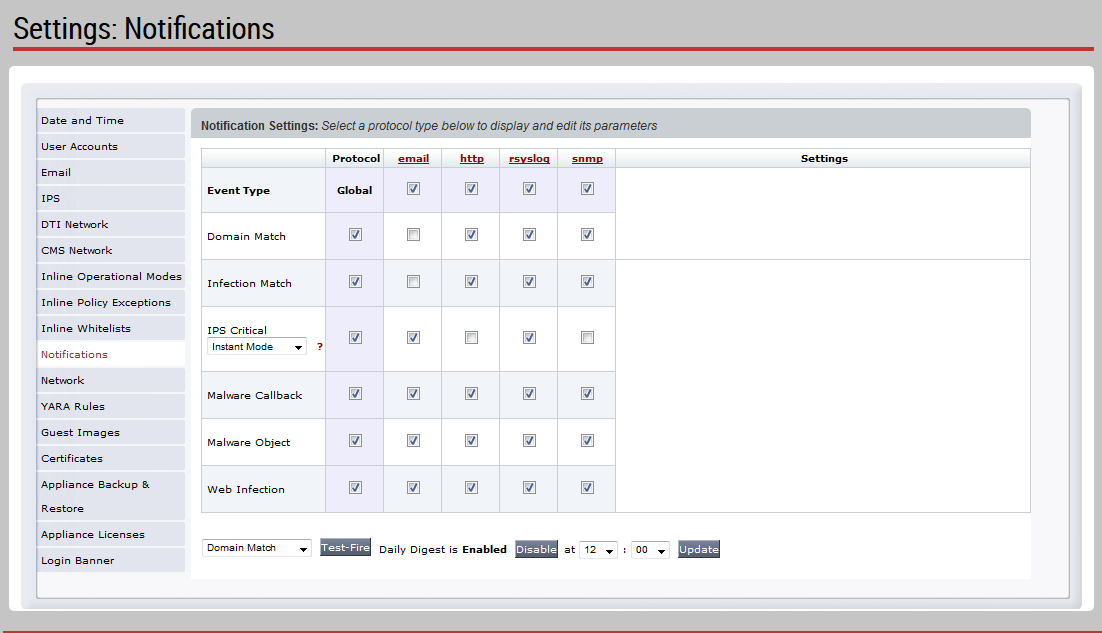
In the drop-down list below the table, select IPS Critical.
Click Test‑Fire.
The system generates an IPS event of severity level 8, which should trigger event notifications for all notification methods configured on the platform.
Choose IPS > IPS Events.
Look for the test-fire IPS event near the top of the list. By default, the list displays the most recent events at the top. IPS test-fire events are listed with the rule name
IPS‑TEST‑FIRE: Malicious PDF Downloaded.Note
After you initiate an IPS test-fire event, the event appears in the IPS Events page for approximately 5 minutes before it disappears from the page display and from the events database.
Look for the test-fire IPS event in the other event notification targets you configured for IPS events.
If a configured notification method fails, correct the notification settings, and then repeat the test.
Testing IPS event notifications (CLI)
This topic describes how to use the CLI to test IPS event notifications.
Prerequisites
Log in to the appliance Web UI as Operator or Admin.
Configure IPS event notifications, as described in Initial configuration of IPS.
Apply IPS policies to the appliance monitoring interfaces, as described in Activating IPS processing.
Procedure
To test IPS event notifications:
Enable the CLI configuration mode.
hostname > enable hostname # configure terminalTest your IPS event notification settings.
hostname (config) # fenotify test‑fire ips-eventThe platform generates an IPS event of severity level 8, which should trigger event notifications for all notification methods configured on the platform.
If a configured notification method fails, correct the configuration settings, and then repeat the test.
Save your changes.
hostname (config) # write memory