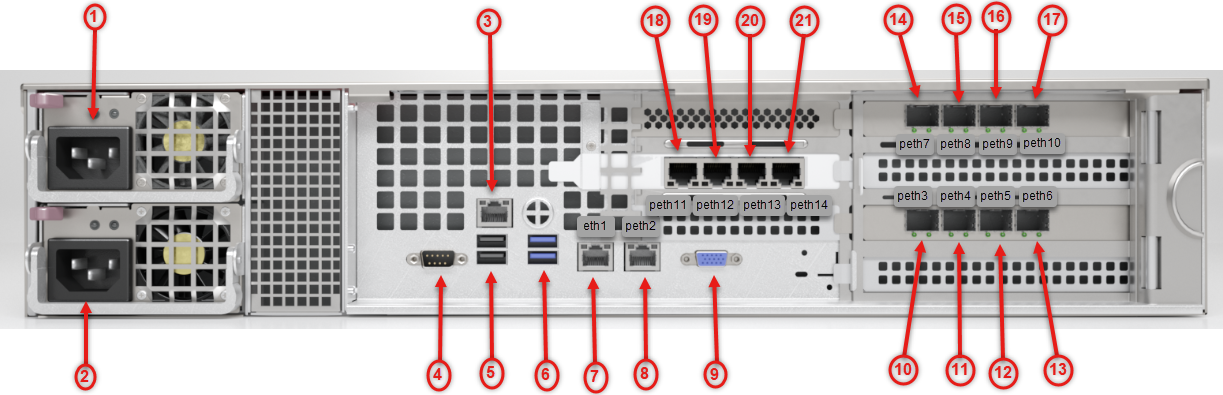
1) Power Supply 1 | 12) pether5 (SFP+) Monitoring 5 Port |
2) Power Supply 2 | 13) pether6 (SFP+) Monitoring 6 Port |
3) IPMI Port | 14) pether7 (SFP+) Monitoring 7 Port |
4) Serial Console Port | 15) pether8 (SFP+) Monitoring 8 Port |
5) USB 2.0 Ports | 16) pether9 (SFP+) Monitoring 9 Port |
6) USB 3.2 Ports | 17) pether10 (SPF+) Monitoring 10 Port |
7) ether1 RJ45 Management Port | 18) pether11 (RJ45) Monitoring 11 Port |
8) pether2 RJ45 Management Port | 19) pether12 (RJ45) Monitoring 12 Port |
9) VGA Connector | 20) pether13 (RJ45) Monitoring 11 Port |
10) pether3 (SFP+) Monitoring 3 Port | 21) pether14 (RJ45) Monitoring 14 Port |
11) pether4 (SFP+) Monitoring 4 Port |
Power
Power: Connect your power source to this port to provide power to the appliance. The appliance comes with one redundant power supply unit for use if the primary unit fails.
I/O Ports
USB 2.0: The port is USB 2.0 compliant.
Serial Console: Connect to this port to manage the appliance from your terminal.
Video: Connect a monitor to this port to view the appliance's command-line interface.
USB 3.2: These ports are USB 3.2 compliant.
Management Ports
ether1 (RJ45): Connect your LAN to this port to enable remote access to the CLI and Web UI. The RJ45 connector is a 10/100/1000BASE-T port.
ether2 (RJ45): Connect your LAN to this port to enable remote access to the CLI and Web UI. The RJ45 connector is a 100/1000/1000BASE-T port.
IPMI: Connect for access to out-of-band management functions, including power control, console redirection, and appliance health status. The connector is a 10/100/1000BASE-T port.
Monitoring Ports
Each interface pair is physically and logically segregated from other interface pairs, preventing communication between the different network segments.
pether (SFP+): The SFP+ connectors accept the following modules:
1000BASE-SX/10GBASE-SR (LC MMF)
1000BASE-LX/10GBASE-LR (LC SMF)
1000BASE-T (RJ45)
10GBASE-CU (5m direct attach cable)
pether3 through pether6 support 10G data rate only.
pether7 through pether10 support 1G/10G data rate.
pether11 through pether14 support up to 1G data rate.
Connect the switch port you want to monitor to this monitoring port.
Link partners connected to the same port pair must have the same data transmission rate (1 Gbps or 10 Gbps). The port pairs are as follows:
pether3 and pether4
pether5 and pether6
pether7 and pether8
pether9 and pether10
pether11 and pether12
pether13 and pether14
Uncertified transceiver modules are not supported. For a list of supported transceiver modules, please contact your sales engineer.