These steps show you how you test the setup for its bypass capability and SNMP traps.
Task
- On a Windows PC, for example, open the iReasoning MIB browser.
-
Click
File → Load MIBs.
A pop-up window appears.
-
Locate the MIB file for the Active Fail-Open kit and click
Open.
The MIB is loaded.
- Configure the parameters for SNMPv3 traps on the server.
-
Login to the web interface of the Active Fail-Open module.
Use default credentials to access the web interface.
- Go to, AFO Configuration → Module <number> to access the configuration page.
- Under Heartbeat Setting, deselect Heartbeat Active Mode.
-
Under
Active OP Mode, select
Bypass from the drop-down list.
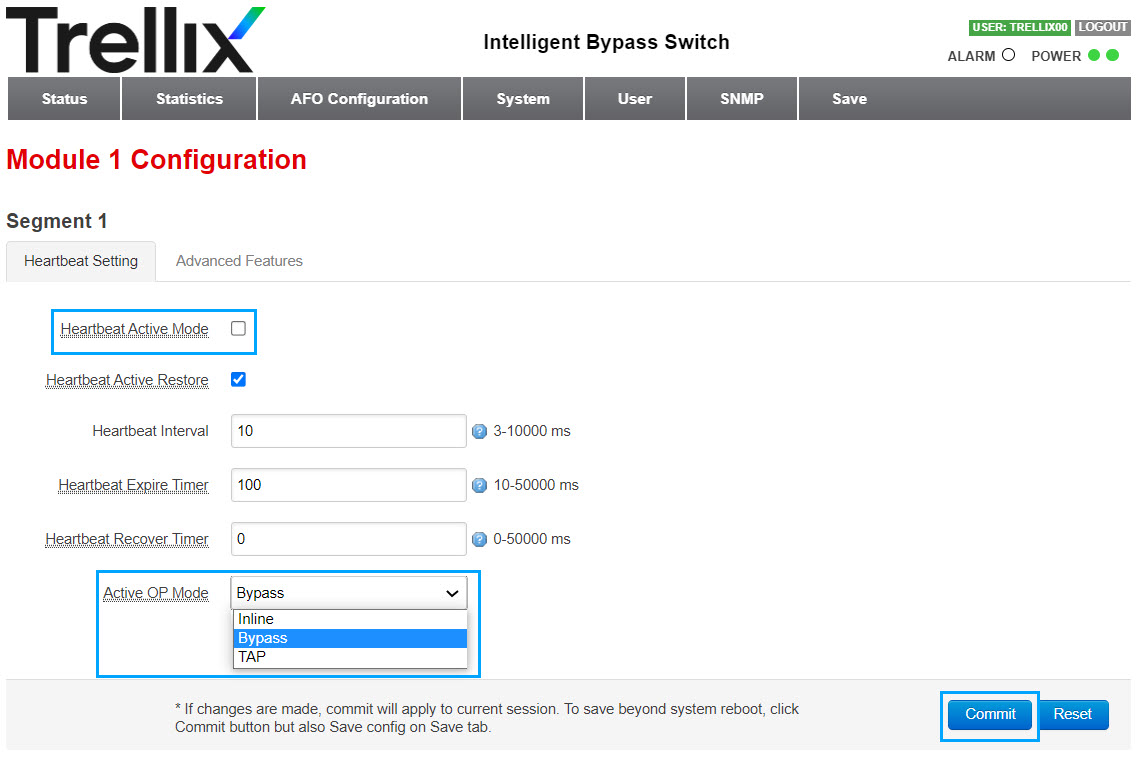
- Click Commit to save your configuration.
- Under Heartbeat Setting, deselect Heartbeat Active Mode.
- Click Commit to save your configuration.