A Network Security HA pair is presented as a single virtual appliance. All alerts that are generated by an appliance while it is in the pair are applied to the pair, not to the individual appliance.
The Alerts pages (Hosts, Alerts, Callback Activities, Malware Summaries) and the IPS Events page in the Central Management System Web UI have drop-down lists, with which you can filter the display based on the individual members or on the HA pair.
If you filter on the pair, the alerts that either appliance generated while it was in the pair are displayed. No alerts that the appliances generated before or after they were in the pair are displayed.
If you filter on an appliance that is a member of a pair, the alerts that the appliance generated before it was in the pair are displayed. No alerts that the appliance generated while it is in the pair are displayed.
In the following example, the appliances named NX-9450-160 and NX-9450-156 are members of the HA pair named Acme_NXHA.

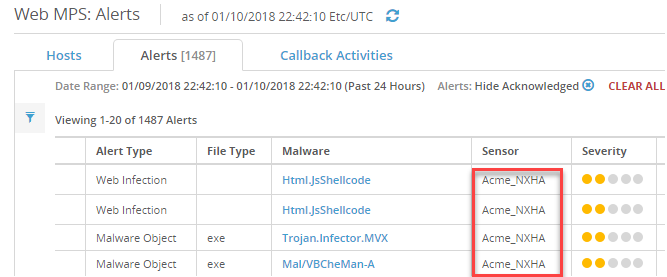
On the Alerts and IPS Events pages, the context in which the alert was applied is shown in the Sensor column. In the following example, the alerts were applied to the HA pair named Acme-NXHA.
Important
See Alert aggregation for information about how the Central Management System handles alerts when appliances are removed from HA pairs, when pairs are deleted, and when appliances that were members of a pair are disconnected from or reconnected to the Central Management System appliance.
Note
You can also view the active alerts for each Network Security appliance from its own Web UI.