This panel lists the top 25 subnets in your monitored network, ranked by the number of callback events detected over the past day, week, or month. Callback events include signature matches and communications with a botnet server. For each subnet listed, the panel displays callback data in the following columns:
Callbacks—Number of callback events detected.
Hosts—Number of infected hosts.
By default, the panel displays callback event data for the first five subnets for the past 24 hours. The following is an example of a default view of the Callback Events panel:
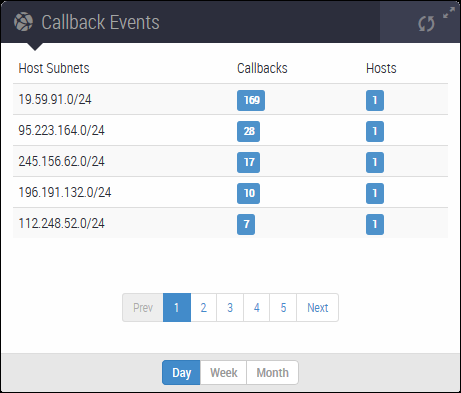
Use the controls at the bottom of the panel to adjust the data displayed:
Change the section of the list that appears in the panel (pages 1 through 5).
Change the period of time covered by the display (day, week, or month).
Two columns in the list contain shortcuts to the Alerts tab: Click a number in the Callbacks column or in the Hosts column to view individual alert groupings, grouped by attack rule name, for an infected subnet. For more information, see Alerts grouped by attack rule names.
The following table lists the filter criteria for each critical malware category in the chart.
Column | Match values in the alerts tab | ||
|---|---|---|---|
Show critical | Type | Sourcer IP | |
Callbacks | Yes |
| IP address of the infected subnet |
Hosts | Yes |
| IP address of the infected subnet |