Use this file to discover all available pages before exploring further.
The new docs.trellix.com features a modernized UI and AI-powered conversational search. Content is currently available in English, with additional languages launching in early November 2026. We hope you enjoy the updated experience.
Press CTRL+K to open search
Configure a new device for indirect mode signature set update
The Manager provides an option to generate and store the signature set and/or device image file on an application directory. You can export the generated file to a directory or a CD, manually ship the CD to a remote location, and then use a TFTP server to transfer the file onto the device.
You can select the device deployment mechanism while adding a new device. By default, all devices added to the Manager have the deployment mode as
Direct. Devices with
Direct mode have the signature set/software directly pushed to the devices as it has been done in the past. Devices for which you want the signature set/software to be manually pushed can be done by selecting the update mode as
Indirect. If required, you can edit the deployment mode later.
Follow this procedure to configure a new device for Indirect update:
Task
Go to
Devices → <Admin Domain Name> → Global → Device Manager.
The
Device Manager page is displayed.
Select the
Sensors tab and click
.
The
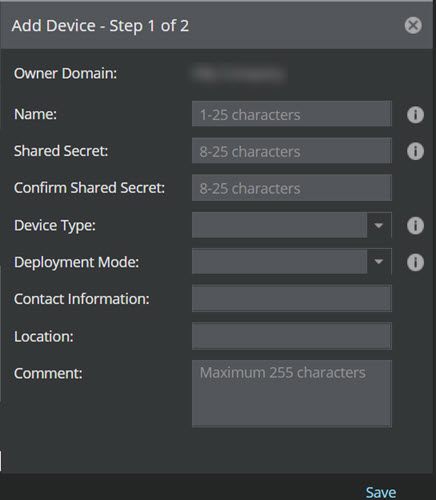
Add Device - Step 1 of 2 panel is displayed.
Enter a device name against
Name.
Provide
Shared Secret details.
Confirm the
Confirm Shared Secret details.
Select
IPS Sensor against
Device Type drop-down.
Select
Indirect against
Deployment Mode drop-down and click
Save.
Add Device - Step 1 of 2 window The device is configured for Indirect updates.
Note
The
Deployment Mode configured on the Primary device of the Fail-Over Pair determines the signature file generation for download.
Note
If the
Deployment Mode for the Primary device is configured as
Indirect, two individual signature files are generated for Primary and Secondary devices, irrespective of the Secondary device configuration.
Note
If the
Deployment Mode for the Primary device is configured as
Direct, the signature file is downloaded
Direct to both the devices, irrespective of the Secondary device configuration.
 .
The Add Device - Step 1 of 2 panel is displayed.
.
The Add Device - Step 1 of 2 panel is displayed.