This section describes the menu options that are available in Custom Attack Editor.
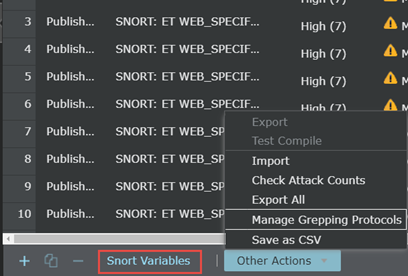
| Option | Definition |
|---|---|
| Applicable to Native Trellix IPS Format and Snort Format | |

|
Click to define a custom attack. You can either create an exploit attack or a reconnaissance attack. You need to create an attack before adding signatures to it. |
.png)
|
Click to copy an existing custom attack. |

|
Click to delete the selected attack from the Manager client. To delete it from the Manager server, you need to click Save after you delete it from the client. |
| Export | Select this option to export the custom attacks in the Manager to a file. |
| Test Compile | Click to Test Compile the selected custom attacks. |
| Import | Select this menu to import Native Trellix IPS Format or Snort Format custom attack from files to the Manager. |
| Check Attack Counts | Click to view the count of published custom attacks. |
| Export All | Click to export all the custom attacks in the Manager to a file. |
| Manage Grepping Protocols | Click to Manage Grepping Protocols. |
| Save as CSV | Click to save the custom attacks in CSV format. |
| Applicable to Snort Format | |
| Snort Variables | Click to manage Snort Variables. |
Important
Before you delete a custom-defined protocol, make sure it is not used in any of the Trellix IPS Custom Attacks.