IPS reconnaissance event entries are listed in the IPS Events page only. You can identify IPS reconnaissance events by the Category value of reconnaissance.
The following example shows the IPS Events page filtered to show IPS reconnaissance events only. For more information, see Showing IPS reconnaissance events (Web UI).
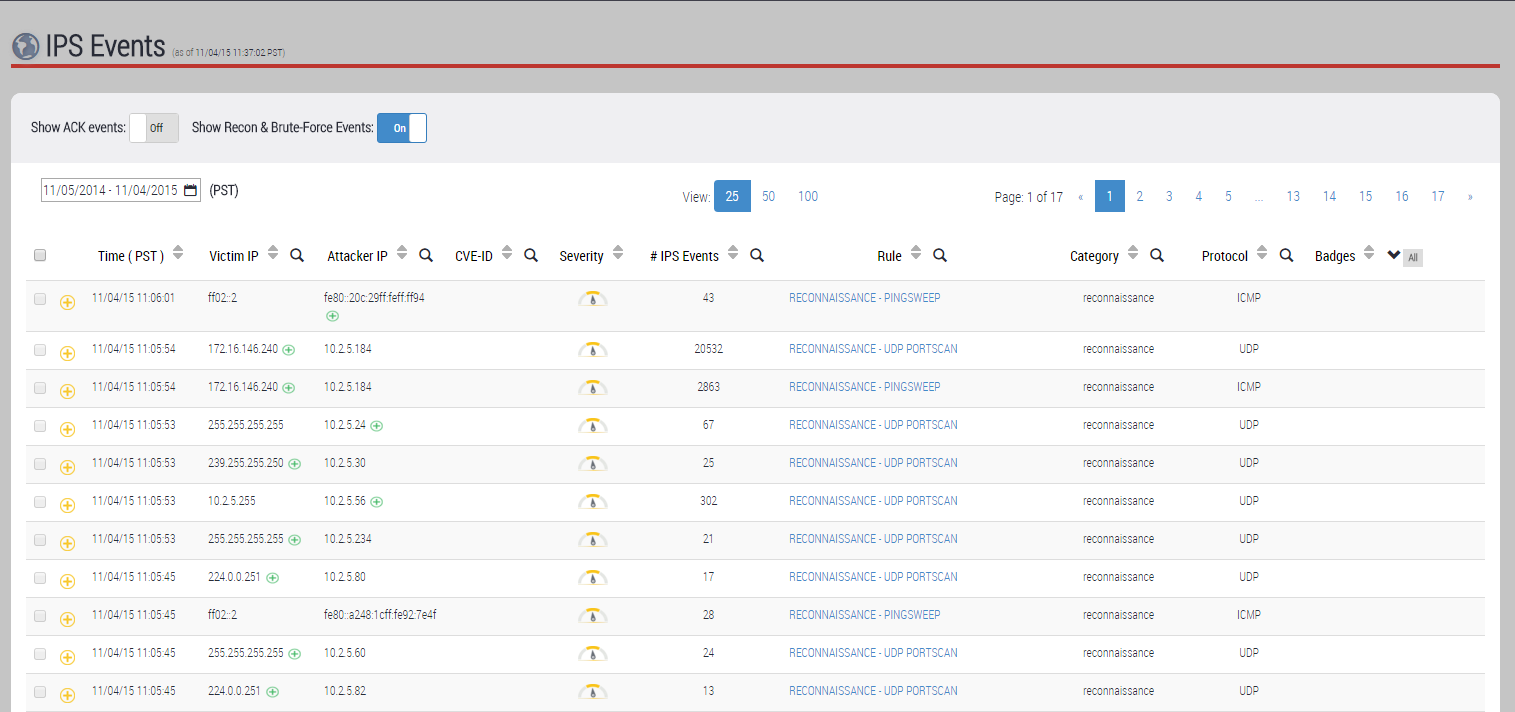
Understanding IPS Reconnaissance Event Entries
Each reconnaissance event entry represents a group of one or more individual reconnaissance events that share the same victim or attacker IP address and reconnaissance subcategory. It is helpful to think of a reconnaissance event entry in terms of the number of victims and attackers it represents.
One-to-Many
If the entry represents a single attacker conducting the same reconnaissance on multiple victims, the Victim IP field displays a green plus icon ( ) next to the IP address of the most recent victim. Click the green plus icon (or the entry's expand icon next to the check box) to expand the entry. The drill-down view displays the IP addresses of the last five victims of the attack but the IP count and port range of the most recent victim only.
Many-to-One
If the entry represents multiple attackers conducting the same reconnaissance on a single victim, the Attacker IP field displays a green plus icon () next to the IP address of the most recent attacker. Click the green plus icon (or the entry's expand icon next to the check box) to expand the entry. The drill-down view displays the IP addresses of the last five attackers but the IP count and port range of the most recent attacker only.
One-to-One
If the entry represents one victim and one attacker, no green plus icon appears. The drill-down view does not list additional victims or attackers, though the number of attacks may be quite high.
How to Find Statistics for Individual Hosts Within an Aggregate Entry
For any IPS reconnaissance event entry that represents either a many-to-one attack or a one-to-many attack, you might notice what appear to be extra one-to-one entries. The one-to-one entries seem to duplicate the information already aggregated into the multi-attacker or multi-victim event entry. The one-to-one entries are included to make available per-victim details or per-attacker details.
For example, suppose the IPS Events list includes an entry that represents one attacker and ten victims (a 1 : 10 entry) of TCP port scans. When the entry is collapsed, you can see the IP address of the most recent victim and the total number of attacks (in the # IPS Events field). When you expand the entry, you can see the IP addresses of four more recent victims. Other statistics in the drill-down view, such as Total Connection Count and Victim IP Count, are aggregates of all ten victims. Elsewhere in the IPS Events list, you will also see ten one-to-one entries that you might think are already accounted for in the 1 : 10 entry. However, these entries contain individual statistics for each victim.