This panel shows the percentage representation of the top ten threat attack types detected during the past day, week, or month. By default, the chart shows threat types seen in the past 24 hours. The following is an example of a default view of the Threat Attacks panel.
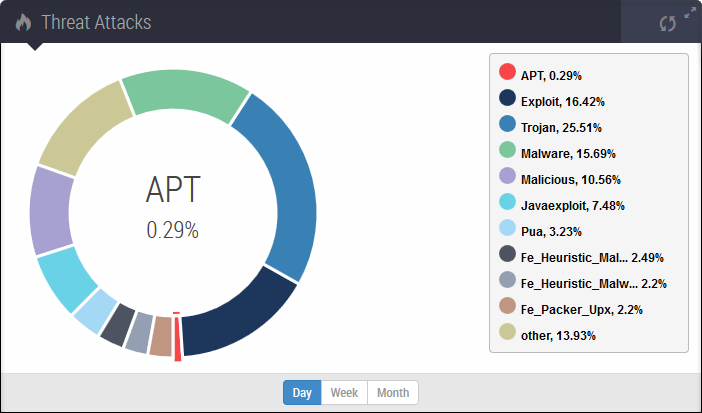
Use the controls at the bottom of the panel and in the legend to adjust the data displayed:
Change the period of time covered by the display (day, week, or month).
Show or hide individual threat attack types.
To filter out a threat attack type, click its colored disc in the legend. The disc becomes a circle. In the following example, the chart shows only the heuristic threat types.
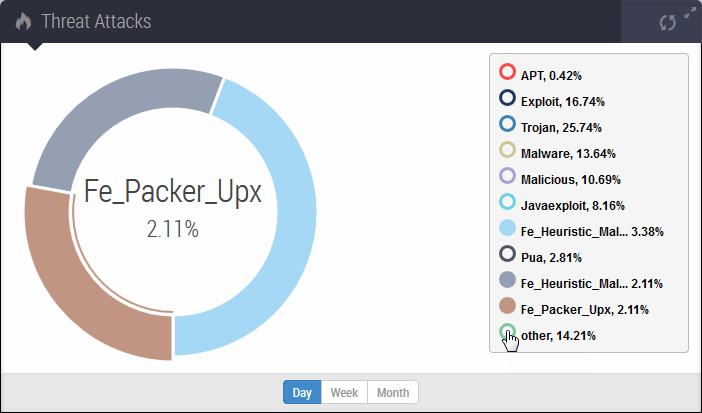
The sections of the pie chart contain shortcuts to the Alerts tab:
Click a threat attack type section in the chart to view the individual alert groupings, grouped by attack rule name, for that threat attack type. For more information, see Alerts grouped by attack rule names.
The following table lists the filter criteria for each threat attack category.
Threat attack type | Match value for the Malware field in the Alerts tab |
|---|---|
APT |
|
Exploit |
|
Fe_Heuristic_Malware_Reflection_Jar_3 |
|
Fe_Heuristic_Malware_Reflection_Jar_6 |
|
Fe_Packer_Upx |
|
Infostealer |
|
Javaexploit |
|
Local |
|
Malicious |
|
Malware |
|
Pua |
|
Trojan |
|