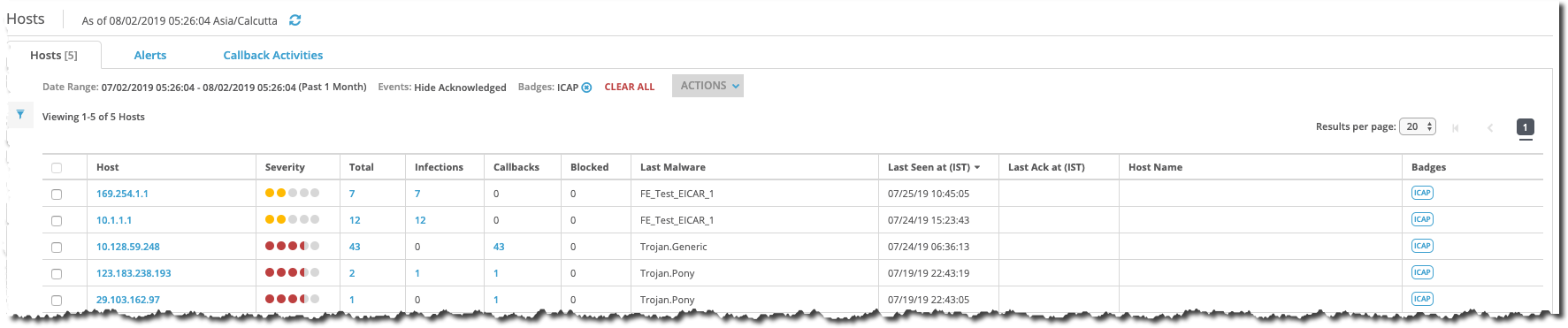
The Hosts tab of the Network Security appliance lists malware alerts and associated callback activity, grouped by source IP address, for web infections, infection matches, malware callbacks, and malware objects in ICAP traffic that was received on the ether1 or ether2 management interface.
The following example displays ICAP alert entries grouped by source IP address and malware type in the Hosts tab. The default display lists entries in reverse chronological order and shows 20 results per page.
Prerequisites
Administrator, Monitor, or Analyst access to the Network Security appliance
Make sure that the third-party device settings are configured so that the device can act as an ICAP client. For details, see ICAP client configuration prerequisites.
You have enabled the ICAP service on the Network Security appliance. For details, see Enabling or disabling ICAP service using the Web UI or Enabling or disabling ICAP service using the CLI.
You have enabled the request modification mode or response modification mode. For details, see Enabling or disabling ICAP request and response modification modes using the Web UI or Enabling or disabling ICAP request and response modification modes using the CLI.
You have configured the ICAP service settings so that the Network Security appliance can run an ICAP server. For details, see Configuring the ICAP server port and SSL certificate using the Web UI or Configuring the ICAP server port and SSL certificate using the CLI.
Choose Alerts > Alerts > Hosts.
Choose the ICAP alert that you want to view.
To expand an entry, click the entry under one of the headings in any column.